


johnb53290723
Participant
July 11, 2024
Question

How do I create a local Testing Server to view pages?

  • July 11, 2024
  • 3 replies
  • 326 views

How do I create a local Testing Server to view pages?

The error below is what Im getting.

I need WYSIWYG so I can view pages.

Not sure why this is impossible... getting decent intructions using ASP pages and IIS???

Ive searched online to no avail instructions not clear on Adobe website.
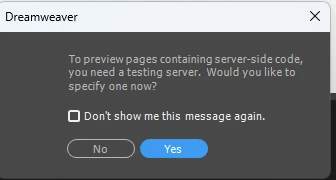
 

    This topic has been closed for replies.

    3 replies

    Nayan_Kankariya
    Community Manager
    Community Manager
    July 17, 2024

    Hi @johnb53290723,


    Thanks for writing to us. Please refer to this KB article for setting up testing server in Dw.


    Link: https://helpx.adobe.com/dreamweaver/using/set-testing-server.html


    Have a pleasant day!


    Regards,

    Nayan

    Dreamweaver Team

    Nancy OShea
    Community Expert
    Community Expert
    July 12, 2024

    For ASP environment, use Visual Studio Code by Microsoft.

       Visual Studio Code

    + Live Preview Extension


    Hope that helps.


    Nancy O'Shea— Product User & Community Expert
    Community Expert
    July 12, 2024

    Unfortunately without a server to process the code, DW cannot show you what your page will look like in Live View which is why this is necessary.. The testing server is different from your live server. It could be hosted somewhere online, and if offered by your host, they would be able to provide. If your host does not support testing environments, then you will need to set one up yourself in a local environment on your computer. This article, while from another application, will show you how to install IIS on Windows 11. Other versions of Windows will have similar processes to set it up.


    https://docs.appeon.com/ps2022r2/Installing_IIS_in_Windows_11.html