Known Participant
December 3, 2023
Answered

how do I determine if an a dreamweaver adobe font is web safe?

  • December 3, 2023
  • 2 replies
  • 1425 views

I have seen in several threads that only "web safe" fonts will work across "most browers".   How do I deternine which fonts are "web safe:?


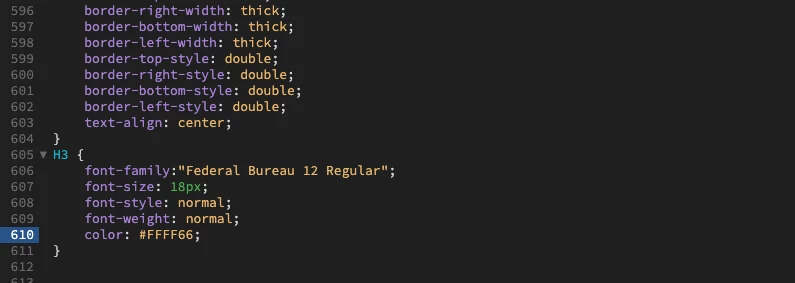
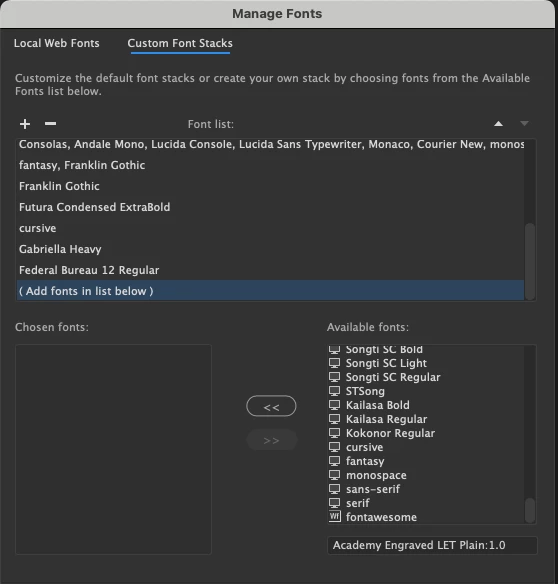
I had tried to assign a font to my H3 selector after bring adding it to my font stacks. in dreamweavr 21.3 on MacOS as shown in the attached screen shots with no sucess


This topic has been closed for replies.
Correct answer Nancy OShea

First, fix your Code Errors.  Some of them are critical.

https://validator.w3.org/nu/?doc=https%3A%2F%2Fwww.kasdivi.com%2F


Second, your fonts are coming directly from Bootstrap.css as expected,  It's the last stylesheet in your stack which gives it highest priority.  See screenshot.
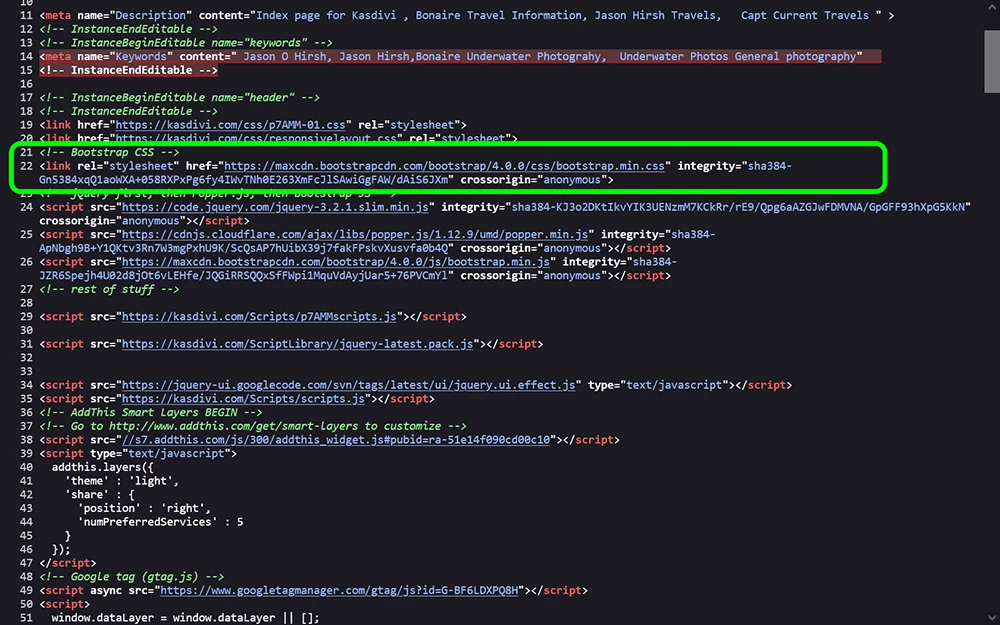
 

Currently, these font-families are being used throughout your site.

--font-family-sans-serif: -apple-system,BlinkMacSystemFont,"Segoe UI",Roboto,"Helvetica Neue",Arial,sans-serif,"Apple Color Emoji","Segoe UI Emoji","Segoe UI Symbol";


--font-family-monospace: SFMono-Regular,Menlo,Monaco,Consolas,"Liberation Mono","Courier New",monospace;


My browser's INSPECT panel (F12) shows a reference to Brush Script MT higher up in the stack (responsivelayout.css) but that's  ignored.  If you want to give it a higher priority than Bootstrap, move it lower in the stack.  DO NOT EDIT BOOTSTRAP CSS!


Hope that helps.

 

2 replies

Nancy OShea
Community Expert
Community Expert
December 4, 2023

CSS Font Stack has a complete list of web safe font-families that are commonly installed on PC's & Macs.

https://www.cssfontstack.com/


Example: 

{font-family: Lucida Grande, Lucida Sans Unicode, Lucida Sans, Geneva, Verdana, sans-serif;}

If the first font isn't available, the next one is used or the next one, and so on...


For special text & headings,  you can source fonts directly from Adobe Fonts or Google Fonts by copying & pasting their embed code into the <head> of your documents. Style with CSS as normal.  NOTE:  It takes a little longer for sourced fonts to load as they're coming from the source's servers.  But if you don't overuse them, it shouldn't be a problem.

https://helpx.adobe.com/fonts/using/add-fonts-website.html


Nancy O'Shea— Product User & Community Expert
Known Participant
December 4, 2023

Thanks agaijn for ypur help nancy.  I had been using a PHP Dynamic text replacement but as seems to happen in most good stuff It was deprecated.  Your lists will help a lot


Community Expert
December 3, 2023

The best thing you can do is to not use that feature in DW and just use the Web Projects feature from Adobe fonts to get code to embed the fonts that you need and not have to manage the fonts yourself as that tool originally did. https://helpx.adobe.com/fonts/using/add-fonts-website.html . You can also do something similar with Google fonts ( https://fonts.google.com/ ). 

Known Participant
December 4, 2023

Thanks for the quick response.   I am working on it. as it is a little time consuming  shall see how it goes and let your know,

Known Participant
December 7, 2023

Ok  I am far from proficient in CSS.    I have added the link to my web project to my sample web page.   I can not figure a  way. to  use this linked CSS.   My efforts in DW using the CSS Designer has "sort of " show me some selectors


Bsed on the I have build a test page ( show in design/live mode)


I have upload the result to http://kasdivi.com/jantest.html.

The web safe fonts that Nancy steered me are shown as expected.   The "embeded ones are not.   

Can any one refer me to an tutorial for dummies that would help.   I can probably get by with the web safe but....