


Participant
November 2, 2016
Answered

How do I downgrade Dreamweaver?

  • November 2, 2016
  • 2 replies
  • 1508 views

Drop downs are way out of line, to the point that I can't navigate through a site or even see all of the files available.
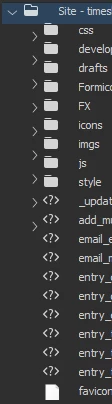
What file am i selecting? This issue extends through out the entire site making it impossible to see files that extend beyond the file menu...
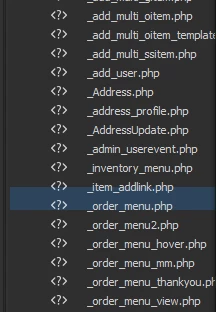
How do I downgrade Dreamweaver?

    This topic has been closed for replies.
    Correct answer lnayal

    Hi Mike,

    It seems your text size is bigger than 100% that's why you are seeing this problem.

    Can you try switching text-size to 100% and then launch DW CC 2017?

    Still if you want to downgrade, then follow below steps:

    1. Uninstall DW CC 2017 and  Launch Creative Cloud

    2. Choose "Previous Versions" in below drop down

    3. Then install DW CC 2015

    Hope this helps.

    thanks,

    Lalita

    2 replies

    Participating Frequently
    November 14, 2016

    Thanks for the clue as to how to revert back to CC2015, thought I quite liked the new UI and was slowly finding my way through it, hit all the problems everyone else has and just can't spend anymore time 'beta' testing have to get back to the day job......reverting back to CC 2015

    lnayalCorrect answer
    Participating Frequently
    November 2, 2016

    Hi Mike,

    It seems your text size is bigger than 100% that's why you are seeing this problem.

    Can you try switching text-size to 100% and then launch DW CC 2017?

    Still if you want to downgrade, then follow below steps:

    1. Uninstall DW CC 2017 and  Launch Creative Cloud

    2. Choose "Previous Versions" in below drop down

    3. Then install DW CC 2015

    Hope this helps.

    thanks,

    Lalita

    Inspiring
    December 30, 2016

    THANK YOU! Upgraded by accident and thought I was going to have to live with 2017!