

John_Allred
Inspiring
May 31, 2020
Answered

How do I get rid of this ghost window?

  • May 31, 2020
  • 3 replies
  • 1118 views

This window or panel appeared on my screen sometime back, and I can't make it go away. Anybody know what it is and how to close it? Sometimes, my entire DW application will get concealed within it. 
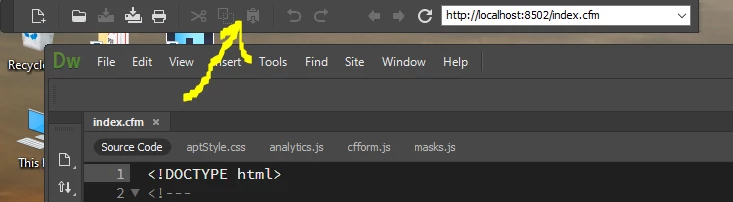
 

Thanks!
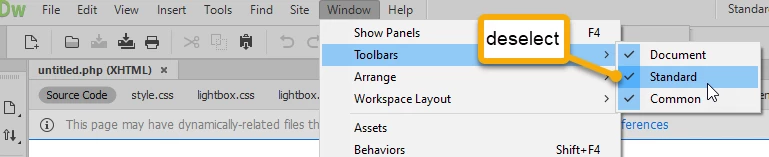
This topic has been closed for replies.
Correct answer BenPleysier


3 replies

Jon Fritz
Community Expert
Community Expert
June 2, 2020

You'll likely want to have easy access to the functions in the Standard Toolbar in the future. Rather than opening/closing it over and over, you can lock it in your application frame.

Click and drag the far left, darker edge of the toolbar then drag it to the top area of your application frame until you see a blue highlight. Once the highlight appears, release the toolbar and it to lock it into your application frame.

Nancy OShea
Community Expert
Community Expert
May 31, 2020

You can drag and dock the Standard Toolbar inside your DW application Frame.  See screenshot.


Nancy O'Shea— Product User & Community Expert
BenPleysier
Community Expert
BenPleysierCommunity ExpertCorrect answer
Community Expert
May 31, 2020


Wappler is the DMXzone-made Dreamweaver replacement and includes the best of their powerful extensions, as well as much more!
John_Allred
Inspiring
May 31, 2020

It seems so obvious, once it's pointed out. Thanks, Ben!