

Galeodan
Known Participant
September 14, 2021
Answered

How do you CSS-style a table by column number?

  • September 14, 2021
  • 4 replies
  • 15170 views

I want my table to have the first column left-aligned and subsequent columns center-aligned. Like this...
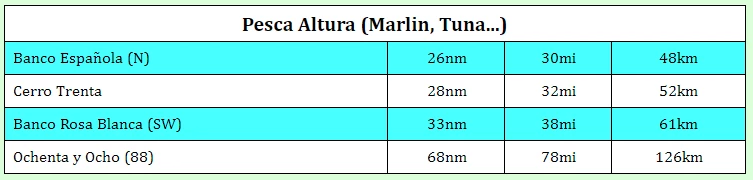
I want to do all the styling in a css file, but don't see a way to do this. I can set row attributes according to row number (odd v even), but I don't find an equivalent for column numbers. So, after setting the stripes and default center-text alignment  in the css, I still end up styling each cell in the first column to be left-aligned.


                    <table class="table-striped">
                        <tr>
                            <th colspan="4">Pesca Altura (Marlin, Tuna...)</th>
                        </tr>
                        <tr>
                            <td style="text-align:left;">Banco Española (N)</td>
                            <td>26nm</td>
                            <td>30mi</td>
                            <td>48km</td>
                        </tr>
                        <tr>
                            <td style="text-align:left;">Cerro Trenta</td>
                            <td>28nm</td>
                            <td>32mi</td>
                            <td>52km</td>
                        </tr>
                        <tr>
                            <td style="text-align:left;">Banco Rosa Blanca (SW)</td>
                            <td>33nm</td>
                            <td>38mi</td>
                            <td>61km</td>
                        </tr>
                        <tr>
                            <td style="text-align:left;">Ochenta y Ocho (88)</td>
                            <td>68nm</td>
                            <td>78mi</td>
                            <td>126km</td>
                        </tr>
                    </table>


Is there a row-number equivalent for columns? Or another simple way to achieve the result?

(PS - I know I could use a class to set the left-align, but it would still have to be done for every row.)

    This topic has been closed for replies.
    Correct answer Nancy OShea

    Use CSS nth-child pseudo-class.

    https://www.w3schools.com/cssref/sel_nth-child.asp


    Zebra Tables

    https://www.w3schools.com/howto/howto_css_table_zebra.asp


    CSS nth-child Recipes

    https://css-tricks.com/useful-nth-child-recipies/


    4 replies

    B i r n o u
    Legend
    September 16, 2021

    youps, sorry I was out for a while... and mailer is pretty full right now, so @Galeodan  you already have your answer and that's fine... this article is pretty old, but it gave some overview of styling TABLE using CSS, just in case here is the link

    https://www.puce-et-media.com/les-tableaux-et-les-donnees-tabulees/

    Galeodan
    GaleodanAuthor
    Known Participant
    September 16, 2021

    Thanks Birnou - Seems you have been away for quite a while 🙂

    Nancy OShea
    Community Expert
    Community Expert
    September 14, 2021

    An example:

    <!doctype html>
    <html lang="en">
    <head>
    <meta charset="utf-8">
    <title>Table Example</title>
    <meta name="viewport" content="width=device-width, initial-scale=1">
    <style>
    table {
    border-collapse: collapse;
    border-spacing: 0;
    width: 100%;
    border: 1px solid #ddd;
    }
    caption, td {
    text-align: center;
    padding: 10px;
    }
    tr:nth-child(even) { background: lightcyan }
    
    tbody>tr>:nth-child(1) {
    color: red;
    text-align: left;
    }
    </style>
    </head>
    <body>
    <table>
    <tbody>
    <caption>
    Pesca Altura (Marlin, Tuna...)
    </caption>
    <tr>
    <td>Something</td>
    <td>1.00</td>
    <td>2.00</td>
    <td>3.00</td>
    </tr>
    <tr>
    <td>Something</td>
    <td>1.00</td>
    <td>2.00</td>
    <td>3.00</td>
    </tr>
    <tr>
    <td>Something</td>
    <td>1.00</td>
    <td>2.00</td>
    <td>3.00</td>
    </tr>
    <tr>
    <td>Something</td>
    <td>1.00</td>
    <td>2.00</td>
    <td>3.00</td>
    </tr>
    </tbody>
    </table>
    </body>
    </html>


    Nancy O'Shea— Product User & Community Expert
    Legend
    September 14, 2021

    You just need to set the first td of each row to text-align: left;


    .table-striped td:first-child {
    text-align: left;
    }

    Galeodan
    GaleodanAuthor
    Known Participant
    September 14, 2021

    Thanks Osgood - just the solution for this table. 

    Nancy OShea
    Community Expert
    Nancy OSheaCommunity ExpertCorrect answer
    Community Expert
    September 14, 2021
    Nancy O'Shea— Product User & Community Expert
    Galeodan
    GaleodanAuthor
    Known Participant
    September 14, 2021

    Thank you for the references, Nancy. Just what I was looking for. I've incorporated Osgood's solution for my existing tables as it is all I need for now, but the references will take me further for new ones.