Participant
Feb 18, 2018 9:54 AM UTC
Answered

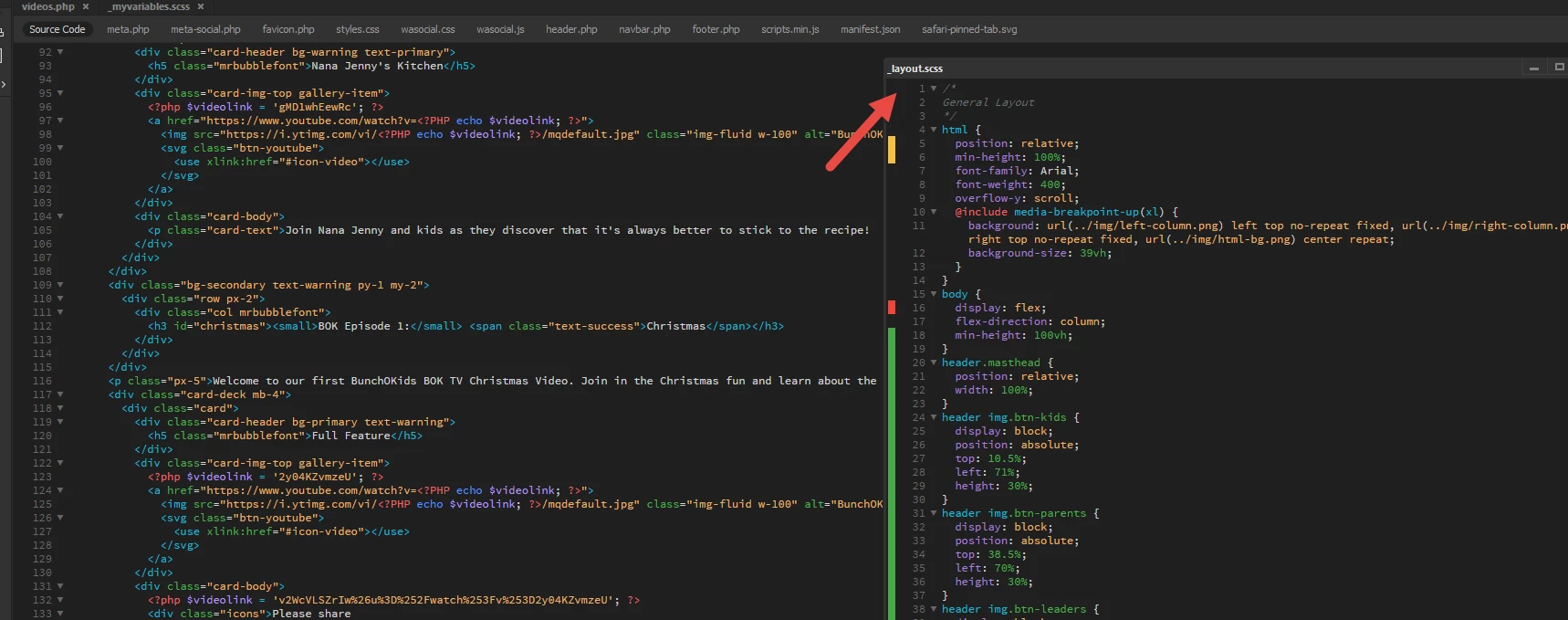
How do you split view two different files?

I managed to splitview the same code, for the love of me I can't find a way to view two different codes in each of the pane. While we are at it, is there a method to simply drag and drop files to create multiple views?

Thank you

This topic is closed to new replies. Start a new post to keep the conversation going.
BenPleysier
BenPleysierCorrect answer
Community Expert
Feb 18, 2018 11:31 AM UTC

Grab the tag of the second file and drag it away form the tab area

Wappler is the DMXzone-made Dreamweaver replacement and includes the best of their powerful extensions, as well as much more!

2 replies

rock1m1Author
Participant
Feb 18, 2018 9:58 AM UTC

Ok I managed to do a horizontal split when DW is in windowed mode. As a a very small target area appears at the bottom where you drag a file into that area to split. I hope there is some better method to it.

Translate
BenPleysier
Community Expert
BenPleysierCommunity ExpertCorrect answer
Community Expert
Feb 18, 2018 11:31 AM UTC

Grab the tag of the second file and drag it away form the tab area

Translate
Wappler is the DMXzone-made Dreamweaver replacement and includes the best of their powerful extensions, as well as much more!