Participant
Dec 6, 2016 6:18 AM UTC
Answered

How retrieve the bootstrap snippet I accidentally deleted?

I am using dreamweaver 2017 and I've accidentally deleted the default snippet that comes with dreamweaver 2017 cs6 how do retrive back that.

This topic is closed to new replies. Start a new post to keep the conversation going.
BenPleysier
BenPleysierCorrect answer
Community Expert
Dec 6, 2016 11:46 AM UTC

Assuming that you mean Dreamweaver CC2017 when you say: "dreamweaver 2017 cs6", enable the Snippets panel by going to Windows > Snippets or by hitting Shift+F9.

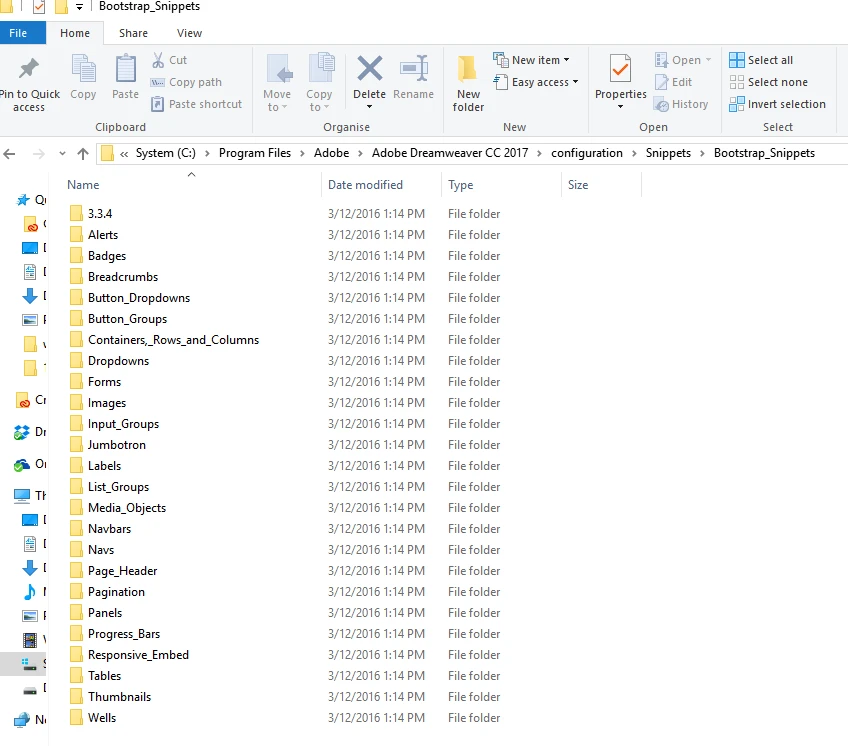
If that is not the problem, check the Bootstrap_Snippets folder and make sure the files are still there

If the files are not there, then the easiest way is to re-install Dreamweaver

Wappler is the DMXzone-made Dreamweaver replacement and includes the best of their powerful extensions, as well as much more!

1 reply

BenPleysier
Community Expert
BenPleysierCommunity ExpertCorrect answer
Community Expert
Dec 6, 2016 11:46 AM UTC

Assuming that you mean Dreamweaver CC2017 when you say: "dreamweaver 2017 cs6", enable the Snippets panel by going to Windows > Snippets or by hitting Shift+F9.

If that is not the problem, check the Bootstrap_Snippets folder and make sure the files are still there

If the files are not there, then the easiest way is to re-install Dreamweaver

Translate
Wappler is the DMXzone-made Dreamweaver replacement and includes the best of their powerful extensions, as well as much more!