
mitchellp61824118
Known Participant
March 6, 2019
Answered

How to add another page link to my nav bar

  • March 6, 2019
  • 5 replies
  • 1931 views

Hi All, I recently built a nav bar in Javascript for a website but I have forgotten how to add an extra page somehow xD I'm just learning to code right now so am very inexperienced. I'd love if anyone could help and lend me a hand with bug fixing and the like too here is my code.
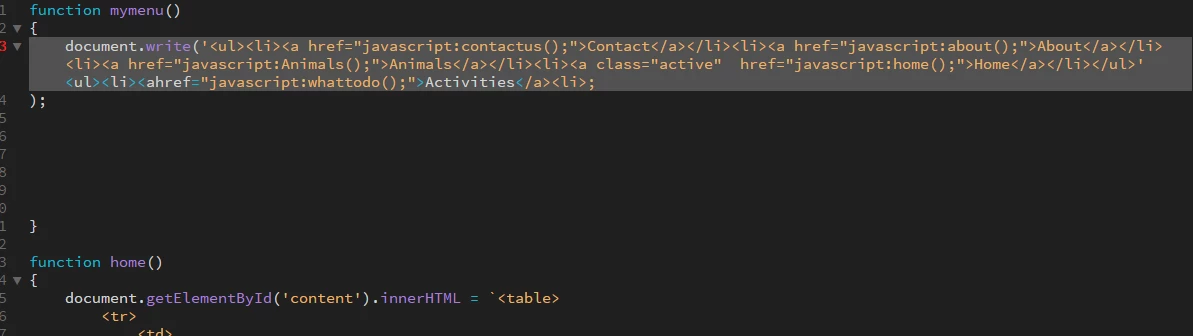
The code for the other pages can be found here too if needed.
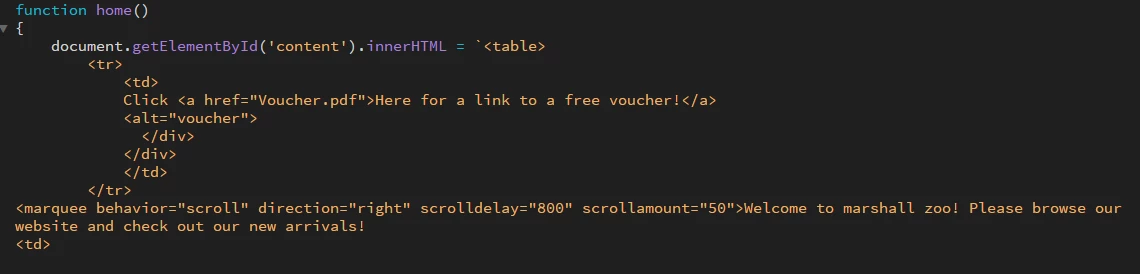

This topic has been closed for replies.
Correct answer Nancy OShea

I'm afraid your use of JavaScript for something so basic as navigation has me baffled.  A few lines of HTML code are all that's necessary.   Use CSS rules to change the appearance.

CSS Styling Links

<nav>

<ul>

<li><a href="index.html">Home</a></li>

<li><a href="voucher.pdf">Voucher</a></li>

<li><a href="contact.html">Contact</a></li>

<li><a href="https://example.com">Example</a></li>

<li>

</ul>

</nav>

5 replies

mitchellp61824118
Known Participant
March 12, 2019

have just managed to get the page to be linked in the nar bar, but as soon as I add the function to my "menu.js file" the website still breaks.

and when I add this extra page my nav bar looks horrible like this so if anyone could further advise me on how to fix this part too i'd appreciate it.

Nancy OShea
Community Expert
Community Expert
March 12, 2019

Open your page in a browser like Firefox or Chrome.  Right-click and select Inspect Element or hit F12.  to open the Developer Toolbar. 

With any luck, you should be able to see the CSS styles that are effecting your navigation menu.

As an example,

Nancy O'Shea— Product User & Community Expert
mitchellp61824118
Known Participant
March 12, 2019

So far I've only managed to get this appear on my site, but as soon as I add the function to my "menu.js" file it breaks the whole site. Im really not sure what im doing wrong lol.

mitchellp61824118
Known Participant
March 7, 2019

To give some context to why im creating a website, it is for a Zoo used for a school project in IT. Im very inexperienced in coding so would appreciate any help available to me here by all of you kind people.

Legend
March 7, 2019

Can we assume apart from adding another page the Contact, About, Animals and Home pages are working?

If so just add an additional function to your <script></script> block and insert your html in the function:

function anotherPage() {

document.getElementById('content').innerHTML =

`<table>

<tr>

<td>

<h2>Another page</h2>

<td>

<tr>

</table>`;

}

Then add the link in your navigation html:

<li><a href="javascript:anotherPage();">Another Page</a></li>

There is no necessity to keep calling the font awesome css file or the <body></body> tags in your Animals function as they should be set up initially in the main page.

mitchellp61824118
Known Participant
March 7, 2019

Hi, I hate to be an annoying student but I attempted to add the code you told me and it broke the entire website and removed the entire nav bar. All pages work as you asked me also.

Nancy OShea
Community Expert
Nancy OSheaCommunity ExpertCorrect answer
Community Expert
March 6, 2019

I'm afraid your use of JavaScript for something so basic as navigation has me baffled.  A few lines of HTML code are all that's necessary.   Use CSS rules to change the appearance.

CSS Styling Links

<nav>

<ul>

<li><a href="index.html">Home</a></li>

<li><a href="voucher.pdf">Voucher</a></li>

<li><a href="contact.html">Contact</a></li>

<li><a href="https://example.com">Example</a></li>

<li>

</ul>

</nav>

Nancy O'Shea— Product User & Community Expert
Legend
March 6, 2019

https://forums.adobe.com/people/Nancy+OShea  wrote

I'm afraid your use of JavaScript for something so basic as navigation has me baffled.

Yeah its baffling most developers........it's coming back into fashion - a bit like that old wallpaper in your ole grandmas house you used to hate when you were a kid.

mitchellp61824118
Known Participant
March 7, 2019

hahha, i know very little about coding so I assume your not wrong and my website is an old wallpaper.

BenPleysier
Community Expert
Community Expert
March 6, 2019

Rather than an image, could you copy and paste the code from the first image here so that we can copy it and make the alterations. Also, please explain why you want to use JavaScript to show the markup (HTML).

Wappler is the DMXzone-made Dreamweaver replacement and includes the best of their powerful extensions, as well as much more!
mitchellp61824118
Known Participant
March 7, 2019

function mymenu()

{

document.write('<ul><li><a href="javascript:contactus();">Contact</a></li><li><a href="javascript:about();">About</a></li><li><a href="javascript:Animals();">Animals</a></li><li><a class="active"href="javascript:home();">Home</a></li></ul>');

}

function home()

{

document.getElementById('content').innerHTML = `<table>

<tr>

<td>

Click <a href="Voucher.pdf">Here for a link to a free voucher!</a>

            <alt="voucher">

  </div>

</div>

</td>

</tr>

<marquee behavior="scroll" direction="right" scrolldelay="800" scrollamount="50">Welcome to marshall zoo! Please browse our website and check out our new arrivals!

<td>

<tr>

</table>`;

}

function Animals()

{

document.getElementById('content').innerHTML = `<table>

<tr>

<td>

<body>

<!-- Add icon library -->

<div class="img-container">

<link rel="stylesheet" href="https://cdnjs.cloudflare.com/ajax/libs/font-awesome/4.7.0/css/font-awesome.min.css">

<div class="container">

  <img src="Tiger_Hero.jpg" alt="Lion Rollover" style="width:100%" class="image">

  <div class="overlay">

<div class="text"><font size="4">There are only a few hundred of these precious animals left in the wild, so we are doing all we can to stop them becoming extinct.

Sumatran tigers have webbed paws, which means that they are brilliant swimmers. Explore that Sumatra in Islands and you could see mother and daughter, Kirana and Kasarna, splashing around in the pool or sunbathing on the rocks.

Sumatran tigers are the smallest of all tigers and their low stance lets them creep up on prey unseen. Their stripes are narrower and closer together than those of other tigers.</font></div>

</a>

  </div>

</div>

</div><!-- img container -->

<div class="img-container">

<link rel="stylesheet" href="https://cdnjs.cloudflare.com/ajax/libs/font-awesome/4.7.0/css/font-awesome.min.css">

<div class="container">

  <img src="lion-face.jpg" alt="Lion Rollover" style="width:100%" class="image">

  <div class="overlay">

<div class="text"><font size="4">Iblis, our nine year old male, is an important part of the European Endangered Species Breeding Programme. This is a carefully managed scheme overseeing the breeding of zoo animals in different countries.

You can find our pride of three beautiful lions, Iblis, Kiburi and Kumari next to The Oakfield. Lions enjoy relaxing and lazing around, they spend between 16 and 20 hours each day resting and sleeping. They have few sweat glands so they wisely tend to conserve their energy by resting during the day to conserve their energy at night for when it is cooler.

The Asiatic lion is listed as endangered on the International Union for the Conservation of Nature (IUCN) Red list. </div>

</a>

  </div>

</div>

</div><!-- img container -->

<div class="img-container">

<div class="container">

  <img src="Rhino.Jpg" alt="Rhino Rollover" style="width:100%" class="image">

  <div class="overlay">

    <div class="text"><font size="4">Reflecting the 'heartland' of India, these swampy flood plains are home to one of the two species of rhino that can be found at Marshall Zoo; here you can find the greater one-horned rhino. These magnificent prehistoric-looking animals enjoy regular dips in the muddy pool, galloping around or grazing on the grasslands.

Just around the corner, over Elephant Bridge, you will also be able to spot two other Asian species exploring their sandy plains and the onager, which is related to the donkey, and the Bactrian camel. Both of these animals are critically endangered in the wild.</div>

  </div>

</div>

<link rel="stylesheet" href="https://cdnjs.cloudflare.com/ajax/libs/font-awesome/4.7.0/css/font-awesome.min.css">

    </a>

  </div><!-- img container -->

</body>

</td>

</tr>

</table>`;

}

function about()

{

document.getElementById('content').innerHTML = `<table>

<tr>

<td>

<textarea rows="4" cols="50">

Our mission is to conserve biodiversity and other natural resources, both locally and internationally – but we rely on the support of thousands to bring it to life!

We engage with over 40,000 children and young people through our conservation educational programmes, and welcome over 500,000 visitors each year to our 140 acre zoological park. In every contact we seek to encourage understanding, and inspire care for the natural world. In essence, we aim to connect people with nature.

Our team of Conservation Biologists run field programmes in the UK & Africa in partnership with communities, statutory agencies and other non-governmental organizations. Find out which species we’re working with and the positive, sustainable impacts we’re making on our conservation website.

</textarea>

</td>

</tr>

</table>`;

}

function contactus()

{

document.getElementById('content').innerHTML = `<table>

<tr>

<td>

<!-- Add icon library -->

<link rel="stylesheet" href="https://cdnjs.cloudflare.com/ajax/libs/font-awesome/4.7.0/css/font-awesome.min.css">

<a href="https://en-gb.facebook.com/" class="fa fa-facebook"></a>

<a href="https://twitter.com/?lang=en-gb" class="fa fa-twitter"></a>

<tr>

<td>

lol

<table align="right">

<tr>

<td>

</form>

</div>

</td>

</tr>

</table>`;

}

I hope this answers your question, and honestly Im not quite sure It was just the way I remember doing it a while ago.