Hosun
Inspiring
July 5, 2019
Answered

How to align the tittle in the middle.

  • July 5, 2019
  • 1 reply
  • 689 views

Hi,

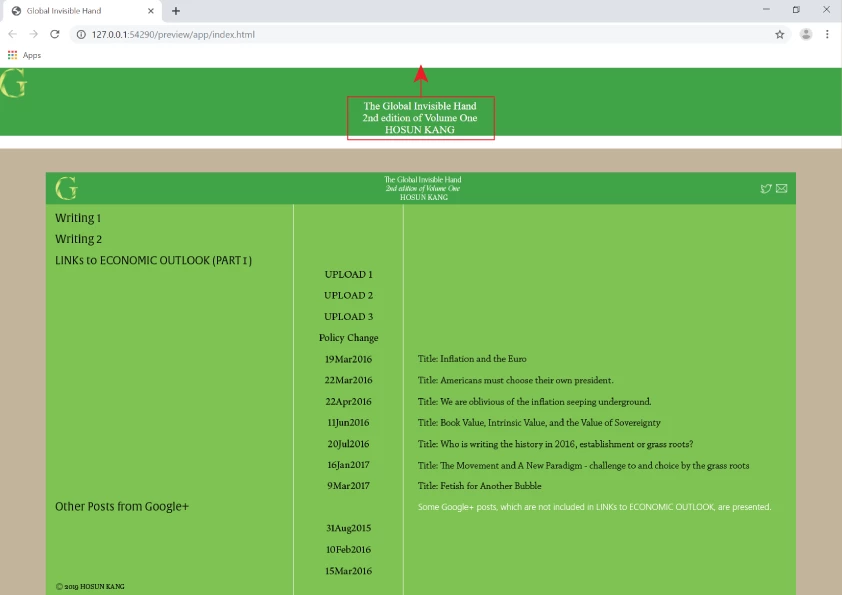
In the header, I want to place the title (red box) in the middle, vertically and horizontally, as seen in the prototype below.

I tried to ".title",

     display: flex;

     align-items: center;

It didn't work.

How would I do?

Global Invisible Hand

Hosun Kang

The Tittle was edited by Moderator.

This topic has been closed for replies.
Correct answer osgood_

You need to appply 'align-items: center' to the 'header css' NOT the 'title css' plus add 'flex: 1' to the 'title css' so that container consumes the remaining horizontal space, then you can apply 'text-align: center' to the h1, see below:

* {

margin: 0px;

padding: 0px;

box-sizing: border-box;

}

header {

display: flex;

align-items: center;

background-color: #42A240;

padding: 20px 40px;

}

.logo {

}

.title {

flex: 1;

}

h1 {

margin: 0;

padding: 0;

font-family: "abril-fatface";

font-size: 16px;

font-weight: 400;

color: white;

text-align: center;

}

1 reply

osgood_Correct answer
Legend
July 5, 2019

You need to appply 'align-items: center' to the 'header css' NOT the 'title css' plus add 'flex: 1' to the 'title css' so that container consumes the remaining horizontal space, then you can apply 'text-align: center' to the h1, see below:

* {

margin: 0px;

padding: 0px;

box-sizing: border-box;

}

header {

display: flex;

align-items: center;

background-color: #42A240;

padding: 20px 40px;

}

.logo {

}

.title {

flex: 1;

}

h1 {

margin: 0;

padding: 0;

font-family: "abril-fatface";

font-size: 16px;

font-weight: 400;

color: white;

text-align: center;

}

Hosun
HosunAuthor
Inspiring
July 6, 2019

Hi,

Thank you very much for your reply.

I am adding a Twitter logo to header.

I changed the image file from png to svg. (I think svg gives a better quality of image.)

But I can't make it appear on header. (It appears on Edge.)

How would I do?

Global Invisible Hand

Hosun Kang

Legend
July 6, 2019

1) Dont use captial letters for 'class' names or 'css selector' names - Twitter should be twitter

<div class="twitter">

2) Add some css to reduce the size of the svg image:

.twitter img {

width: 25px;

}