



sambegdouri
Inspiring
June 11, 2017
Answered

How to centre a <button> within a form?

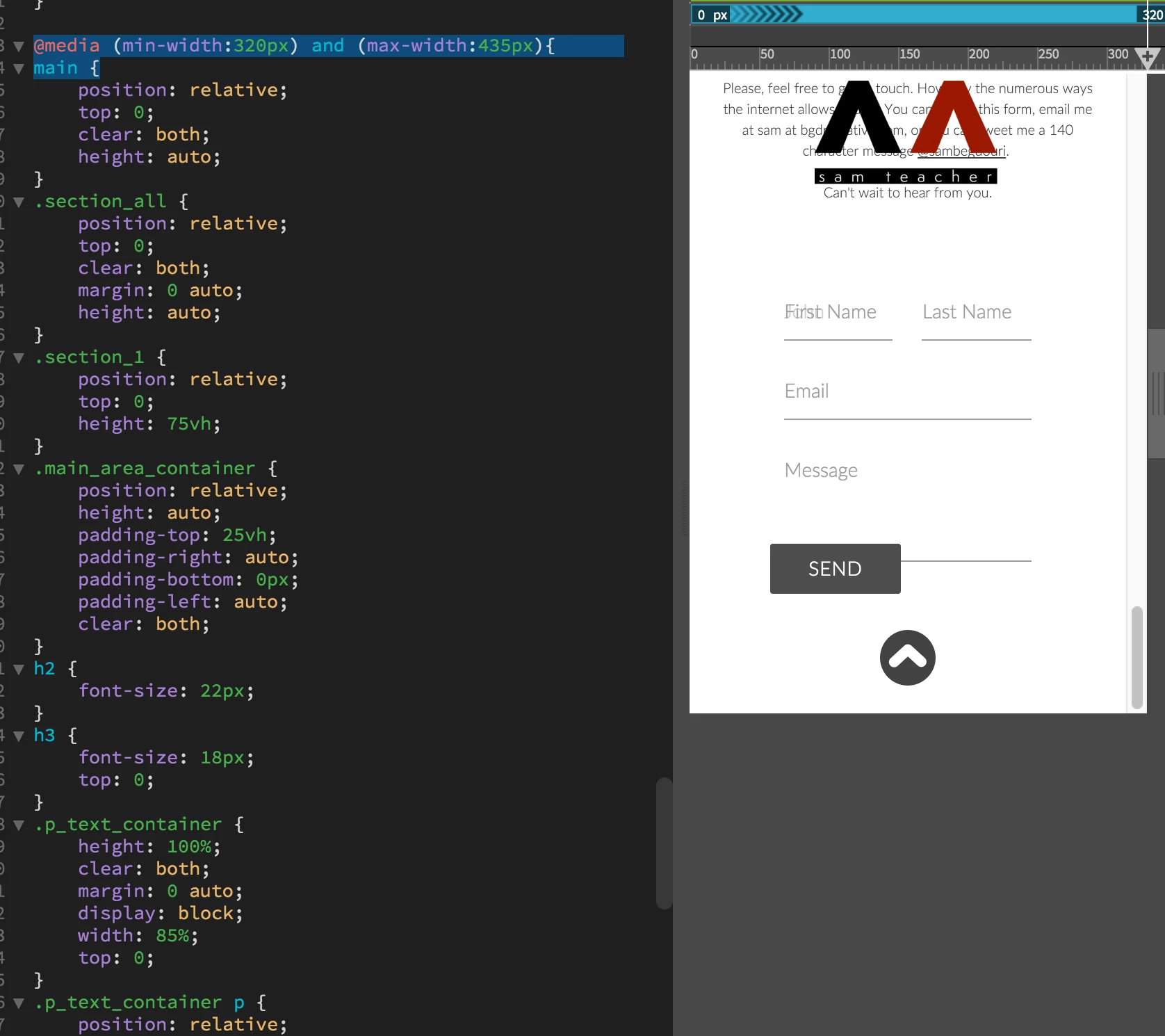
I am haveing some difficulty with my contact form. I cannot seem to centre or the button and overlaps the bottom of the message <textarea>. I have some screen shots and code to help ex[lain what I mean, also a Dropbox link is also available for a more hands-on look (Dropbox - Troubleshoot Web),,,

How can keep the button within its parent/grandparents and keep it centred at the same time? To keep it responsive, I want the positions to stay relative.

<div class="contact_form">

      <div class="formContainer">

     
               <div class="row">

                   <form id="my_form" onsubmit="submitForm(); return false;" class="col s12" method="post" enctype="text/plain">


                             <!-- first and last name-->

                              <div class="row">


                                   <!--first name-->

                                      <div class="input-field col s6">

                                             <input placeholder="John" id="first_name" type="text" class="validate" required>

                                             <label for="first_name">First Name</label>

                                      </div>


                                      <!--last name-->

                                      <div class="input-field col s6">

                                             <input id="last_name" type="text" class="validate">

                                             <label for="last_name">Last Name</label>

                                      </div>

                               </div>


                              <!--email-->

                               <div class="row">

                                      <div class="input-field col s12">

                                                 <input id="email" type="email" class="validate" required>

                                                  <label for="email" data-error="Umm - Something's not right here" data-success="This seems correct">Email</label>

                                      </div>

                               </div>


                          <!--message box-->

                          <div class="row">

                                 <div class="input-field col s12 message_input">

                                        <textarea id="textarea1" class="materialize-textarea" required></textarea>

                                        <label for="textarea1">Message</label>

                                 </div>

                          </div>


                      <div class="button_container">

                          <button class="btn waves-effect waves-light" type="submit" name="action">SEND</button>

                      </div>


              </form>

            </div>

     </div><!--formContainer END-->

  </div><!--contact_form END-->

@media (min-width:320px) and (max-width:435px){

main {

.contact_form {

  position: relative;

  top: 0;

  height: auto;

}

.formContainer {

  position: relative;

  top: 0;

  height: 500px;

}

form {

  position: relative;

  margin: 0 auto;

  top: 0;

  height: 100%;

}

.button_container {

  position: relative;

  top: 0;

  height: 100px;

  width: 100%;

}

button {

  position: relative;

  padding-top: 100px;

}

}
This topic is closed to new replies. Start a new post to keep the conversation going.
BenPleysier
BenPleysierCorrect answer
Community Expert
June 11, 2017

If you replace the style rules with these, then the button will be centered between 320px and 435px

@media (min-width:320px) and (max-width:435px) {

     main {

     }

     .s12 {

          width: 85%;

     }

     .contact_form {

          /*position: relative;*/

          /*top: 0;*/

          /*height: auto;*/

     }

     .formContainer {

          /*position: relative;*/

          /*top: 0;*/

          /*height: 500px;*/

     }

     form {

          /*position: relative;*/

          /*margin: 0 auto;*/

          /*top: 0;*/

          /*height: 100%;*/

     }

     .button_container {

          /*position: relative;*/

          /*top: 0;*/

          /*height: 100px;*/

          /*width: 100%;*/

     }

     button {

          /*position: relative;*/

          /*padding-top: 100px;*/

          display: block;

          margin: auto;

     }

}

Wappler is the DMXzone-made Dreamweaver replacement and includes the best of their powerful extensions, as well as much more!

2 replies

BenPleysier
Community Expert
BenPleysierCommunity ExpertCorrect answer
Community Expert
June 11, 2017

If you replace the style rules with these, then the button will be centered between 320px and 435px

@media (min-width:320px) and (max-width:435px) {

     main {

     }

     .s12 {

          width: 85%;

     }

     .contact_form {

          /*position: relative;*/

          /*top: 0;*/

          /*height: auto;*/

     }

     .formContainer {

          /*position: relative;*/

          /*top: 0;*/

          /*height: 500px;*/

     }

     form {

          /*position: relative;*/

          /*margin: 0 auto;*/

          /*top: 0;*/

          /*height: 100%;*/

     }

     .button_container {

          /*position: relative;*/

          /*top: 0;*/

          /*height: 100px;*/

          /*width: 100%;*/

     }

     button {

          /*position: relative;*/

          /*padding-top: 100px;*/

          display: block;

          margin: auto;

     }

}

Translate
Wappler is the DMXzone-made Dreamweaver replacement and includes the best of their powerful extensions, as well as much more!
sambegdouri
Inspiring
June 11, 2017

Thank you, sir.

Translate
