Participant
January 3, 2023
Answered

How to change [Workspace] Layout?

Hi

How can i change the Layout of DM? I want to have the Part with the Code on the left side and the local folder structure on the right side. I can't finde a "how to" for this.

Thanks in advance.

This topic is closed to new replies. Start a new post to keep the conversation going.
Nancy OShea
Nancy OSheaCorrect answer
Community Expert
January 3, 2023

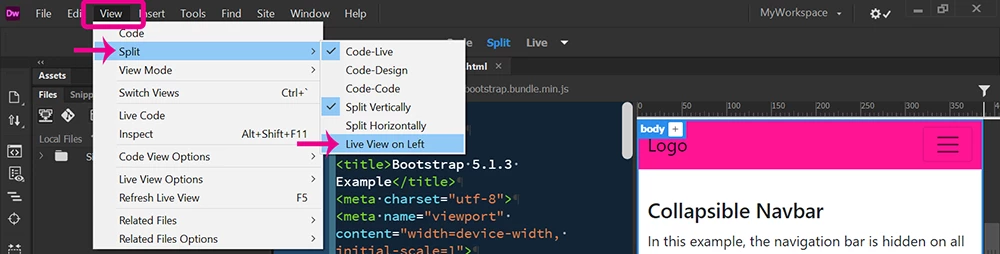
View > Split View > Split Vertically > Live View on Left.  See screenshot.


Nancy O'Shea— Product User & Community Expert

4 replies

derf6545gAuthor
Participant
January 4, 2023

Thank you all for the replies, now i have made it! 🙂

Translate
Nancy OShea
Community Expert
Community Expert
January 3, 2023

You can click, hold & drag Files Panel to another part of the application frame until you see a blue border around it, then release.


When you're finished customizing your workspace, save Workspace as a re-usable preset.


Translate
Nancy O'Shea— Product User & Community Expert
Nancy OShea
Community Expert
Nancy OSheaCommunity ExpertCorrect answer
Community Expert
January 3, 2023

View > Split View > Split Vertically > Live View on Left.  See screenshot.


Translate
Nancy O'Shea— Product User & Community Expert
Community Expert
January 3, 2023

These steps will help guide you in the process of creating a custom workspace as you are looking for: https://helpx.adobe.com/dreamweaver/using/dreamweaver-workflow-workspace.html . Using those steps you can change the workspace to look the way you want it and then click on the Workspace Switcher in the top right to save your workspace.

Translate