mhaydon
Participant
January 25, 2019
Answered

How to color code .vue file?

  • January 25, 2019
  • 1 reply
  • 1637 views

Hello. My .Vue files are displaying as all white. I would like them to have the same color coding as my .html files. Please advise as to how i can get .vue files to have code coloring.

    This topic has been closed for replies.
    Correct answer Jon Fritz

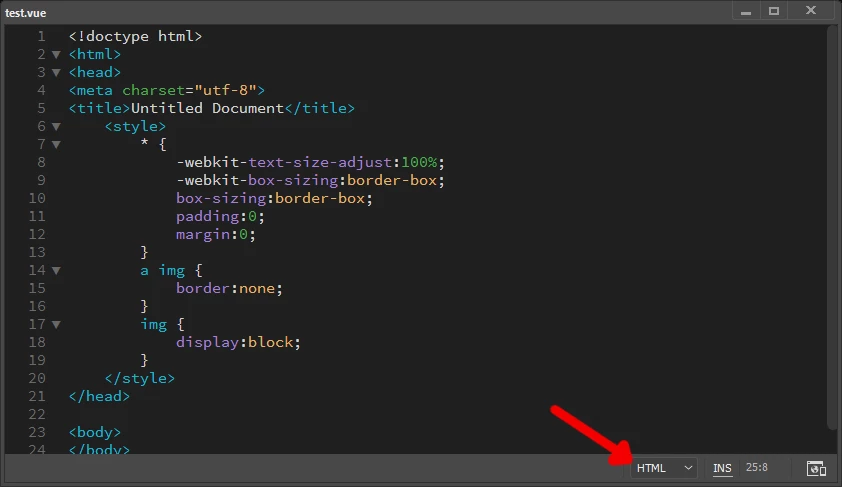
    In the bottom right of the window, choose the type of file you'd like DW to treat it as.

    For example, HTML...

    ...and that should change the code coloring to match. Keep in mind though, if the code isn't valid html, php, etc the code coloring will likely end up looking wrong.

    1 reply

    Jon Fritz
    Community Expert
    Jon FritzCommunity ExpertCorrect answer
    Community Expert
    January 25, 2019

    In the bottom right of the window, choose the type of file you'd like DW to treat it as.

    For example, HTML...

    ...and that should change the code coloring to match. Keep in mind though, if the code isn't valid html, php, etc the code coloring will likely end up looking wrong.

    mhaydon
    mhaydonAuthor
    Participant
    January 25, 2019

    Perfect! Thank you.