


alexh_NI
Participant
December 8, 2017
Answered

How to create a check box in dreamweaver 2017

  • December 8, 2017
  • 2 replies
  • 3711 views

Hi Guys,

I am creating html link in dreamweaver for user to click on the link and move to the next webpage. However, I want to create a check box so that the user can check the box and click on the link, so that when they go back to the main page, the know that they had visited to link by clicking on the check box.

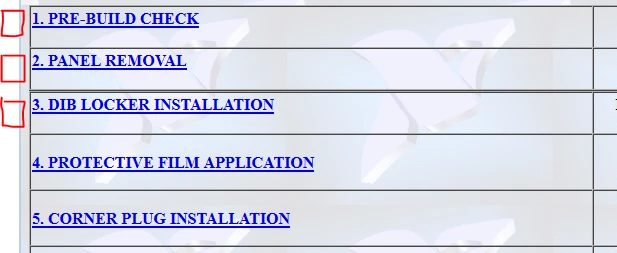
How can I do that? For example below, I want to create a check box "as shown in red" so that user can check it and they know they had visited the link before moving on to the next link.

Thank you !
This topic has been closed for replies.
Correct answer BenPleysier

Adding to osgood_'s answer, you could also try storing the info in Web Storage, no need for a checkbox because a check mark can be added automatically

Web Storage object comes in two flavours, namely

  • localStorage
  • sessionStorage

The information in session storage, like using PHP_Session, gets wiped when the brouwser is closed. Local storage has no termination date, hence this method can be used if you want the visited link to be highlighted everytime the user comes back. For further info, Google the subject or see Web Storage API - Web APIs | MDN

The good part of Web Storage is that you do not need a seprate server side processor to achieve your goal.

2 replies

Legend
December 8, 2017

You're not going to like this a lot but its doable using php SESSIONS. (I dont expect much of a response). It even checks the checkbox if the user doesnt, because otherwise it would be a useless concept.

Create your 5 pages:

pre_build_check.php

panel_removal.php

dib_locker_installation.php

protective_film_application.php

corner_plug_installation.php

Then just put the below on each page.

<?php

// Start the session

session_start();

// get the id form the link

$id = $_GET['id'];

if($id == 1) {

$_SESSION['pre_build'] = true;

}

elseif($id == 2) {

$_SESSION['panel_removal'] = true;

}

elseif($id == 3) {

$_SESSION['dib_locker'] = true;

}

elseif($id == 4) {

$_SESSION['protective_film'] = true;

}

elseif($id == 5) {

$_SESSION['corner_plug'] = true;

}

?>

<!DOCTYPE html>

<html>

<head>

<meta charset="UTF-8">

<title>Link Checkbox</title>

<style>

.check_box_navigation {

margin: 0;

padding: 0;

}

.check_box_navigation li {

margin: 0;

padding: 0;

list-style: none;

}

</style>

</head>

<body>

<ul class="check_box_navigation">

<li><input type="checkbox" name="pre_build" <?php if(isset($_SESSION['pre_build'])) { echo "checked"; } ?>><a href="pre_build_check.php?id=1">Pre-Build Check</a></li>

<li><input type="checkbox" name="panel_removal" <?php if(isset($_SESSION['panel_removal'])) { echo "checked"; } ?>><a href="panel_removal.php?id=2">Panel Removal</a></li>

<li><input type="checkbox" name="dib_locker" <?php if(isset($_SESSION['dib_locker'])) { echo "checked"; } ?>><a href="dib_locker_installation.php?id=3">Dib Locker Installation</a></li>

<li><input type="checkbox" name="protective_film" <?php if(isset($_SESSION['protective_film'])) { echo "checked"; } ?>><a href="protective_film_application.php?id=4">Protective Film Application</a></li>

<li><input type="checkbox" name="corner_plug" <?php if(isset($_SESSION['corner_plug'])) { echo "checked"; } ?>><a href="corner_plug_installation.php?id=5">Corner Plug Installation</a></li>

</ul>

</body>

</html>

BenPleysier
Community Expert
Community Expert
December 8, 2017

A very easy way to show that the link has been used is to change its colour. Have a look here for a demo Tryit Editor v3.5

Wappler is the DMXzone-made Dreamweaver replacement and includes the best of their powerful extensions, as well as much more!
alexh_NI
alexh_NIAuthor
Participant
December 8, 2017

Thank you for that.

Actually I had relied on colours but the thing is the page need to be refreshed each time.

Secondly, the link is being used in multiple webpage and if I click on the link at one of the webpage, the other webpage will change colour as well, indicating that the link had been clicked.

Example: I click on Link1 a Webpage A. The colour will change. Automatically, the Link1 colour will also change for Webpage B

Webpage A

Link1

Webpage B

Link1

Nancy OShea
Community Expert
Community Expert
December 8, 2017

The thing is you're very limited in what you can do with visited links now because of browser security.  Changing color is about all you can do.  In the past we could use Before or After pseudo-classes to add a check mark.  But that no longer works.   See below for the whole story.

https://hacks.mozilla.org/2010/03/privacy-related-changes-coming-to-css-vistited/

Nancy

Nancy O'Shea— Product User & Community Expert
