
Inspiring
September 27, 2026
Question

how to create a vertical navigation bar

  • September 27, 2026
  • 5 replies
  • 30 views

Hello,

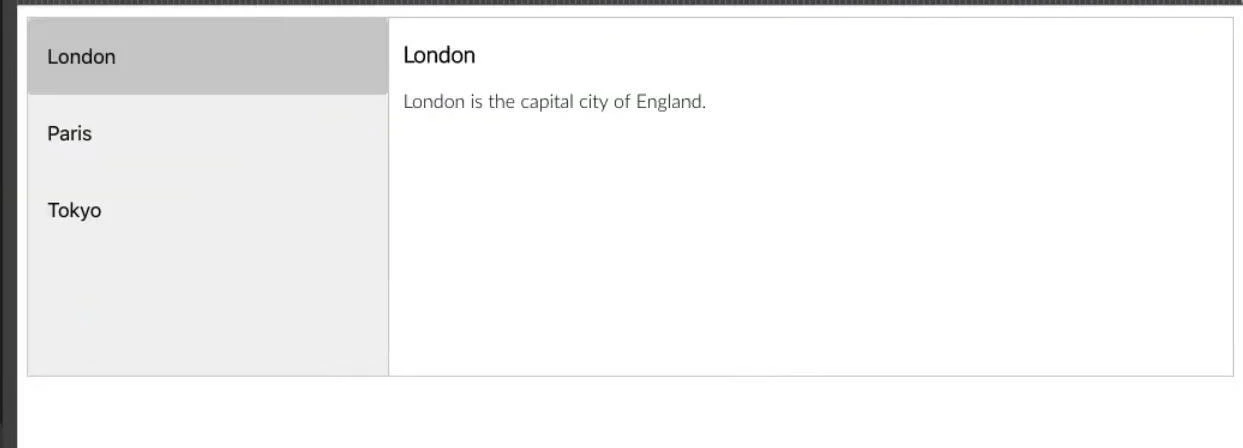
In Dreamweaver, I would like to find a pre-defined tool that let us create this type of vertical navigation bar. Is it possible to create and manage it easily (without coding) inside dreamweaver ?


    5 replies

    Community Expert
    September 28, 2026

    Dreamweaver can actually help you build this using its Bootstrap components.

    Before going further, when you say "without coding", do you mean that you do not want to write any code at all, or would you be comfortable adding or modifying two or three small lines of HTML/CSS?

    If a small amount of code is acceptable, Dreamweaver's Bootstrap Tabs component can be adapted to place the tabs vertically on the left and display the corresponding content on the right. Bootstrap already handles the JavaScript interaction.

    Dreamweaver's Bootstrap integration is described here:
    https://helpx.adobe.com/dreamweaver/desktop/layout-and-design/bootstrap.html

    If that approach suits you, I can show you the steps to build it in Dreamweaver.

    Nancy OShea
    Community Expert
    Community Expert
    September 28, 2026

    Bootstrap components only work in Bootstrap documents. So if you’re already using Bootstrap’s mobile-first framework for your site, this would be a logical solution. However, if you’re not using Bootstrap, it’s overkill for such a small task. 


    Bootstrap Navs & Tabs:

    https://getbootstrap.com/docs/5.2/components/navs-tabs/


    Best advice for all Bootstrap users:  use the latest version 5. 

    https://getbootstrap.com/docs/versions/

    The previous version in Dreamweaver is no longer being maintained. 


    Nancy O'Shea— Product User & Community Expert
    Inspiring
    September 27, 2026

    ​@Nancy OShea 

    In fact, I was thinking to something like : https://www.w3schools.com/howto/howto_js_vertical_tabs.asp

    What do you think ? My goal is that, on the same page, when I click on the menu at left, it displays the content at right. So, there is javascript here.

    I was wondering if dreamweaver has a similar tool that could do this ? 

    Nancy OShea
    Community Expert
    Community Expert
    September 27, 2026

    There might be a script for one in your Snippets folder.

    Sorry I can’t be more specific. My Snippets contains lots of custom code I’ve added over the years. I don’t remember which bits came with Dreamweaver & which ones didn’t. 


    Nancy O'Shea— Product User & Community Expert
    Nancy OShea
    Community Expert
    Community Expert
    September 27, 2026

    Without coding?  NO.

    At a minimum, you’ll need an unordered list of links in HTML and some CSS styles to make it look pretty.

    See link below for details.

    https://www.w3schools.com/howto/howto_css_vertical_menu.asp


    Nancy O'Shea— Product User & Community Expert