
Inspiring
November 13, 2021
Answered

How to do a horizontal rule in DW CC2021

  • November 13, 2021
  • 3 replies
  • 569 views

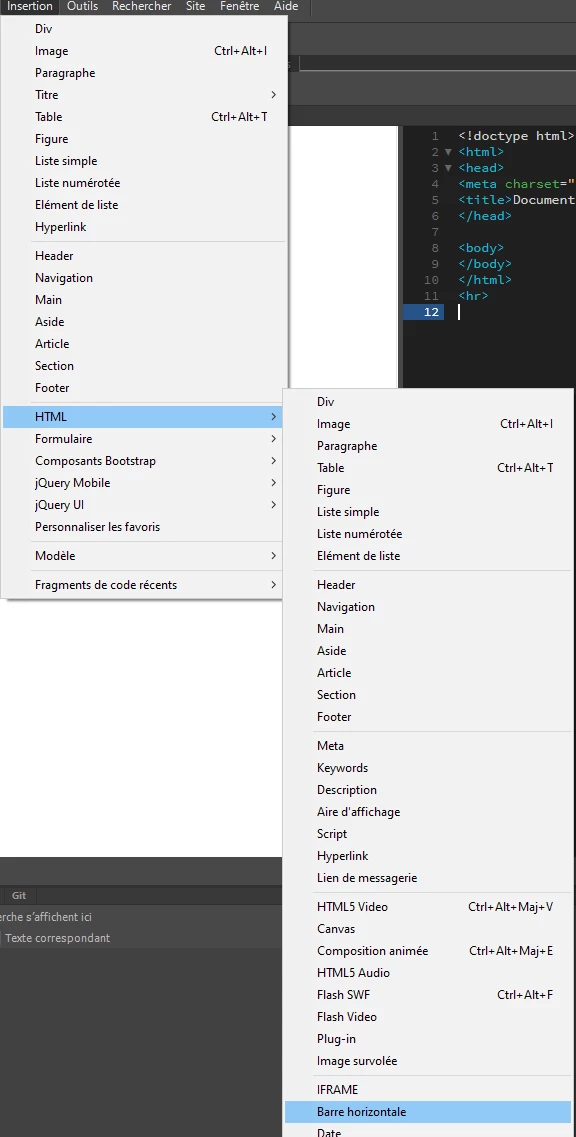
I use lots of horizontal rules in my layout; they used to be found in the insert/html window. The most recent version of Dreamweaver seems to have deleted this. Is there a way to do horizontal rules without having to go into code?
This topic has been closed for replies.
Correct answer B i r n o u

here on 21.2 there is still the horizonbar in the insert > HTML menu


3 replies

Nancy OShea
Community Expert
Community Expert
November 13, 2021

The <hr> tag is all you need.


Nancy O'Shea— Product User & Community Expert
B i r n o u
Legend
November 13, 2021

the OP said, without having to go into the code 🙂

Nancy OShea
Community Expert
Community Expert
November 13, 2021

Typing <hr> is so much quicker and easier than clumsy panels.  There's no reason not to know the code for it. That's why Dreamweaver has Code View. 😘


And for anyone who wants très chic horizontal styles,  CSS Tricks has some cool examples to copy & paste into your own stylesheet.  Give it a try.

https://css-tricks.com/examples/hrs/


Have fun & happy coding!


Nancy O'Shea— Product User & Community Expert
B i r n o u
Legend
November 13, 2021

ans also in the menu bar (fourth one before the end)


B i r n o u
B i r n o uCorrect answer
Legend
November 13, 2021

here on 21.2 there is still the horizonbar in the insert > HTML menu


Inspiring
November 13, 2021

Wow, I don't know how many times I scrolled down that list and didn't see it (it used to be near the top). Maybe it helped that your snip was in French and I had to put my brain in gear and translate!

Thanks!


B i r n o u
Legend
November 13, 2021

yep, I agree that it should be more accessible, perhaps that you could create a specific shortcut, if you have to use it very often, or use the insert panel as a document tab (ahead of the document itself) and click on the icon.