Participating Frequently
December 12, 2017
Answered

How to get back menu bar?

  • December 12, 2017
  • 3 replies
  • 1234 views

How can i get the original menu bar on the top:

i want to remove the afore shown bar and revert to original File Edit etc etc..?

    This topic has been closed for replies.
    Correct answer Brad Lawryk

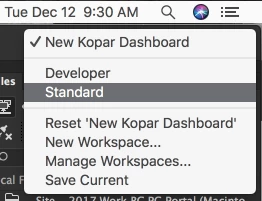
    Just restore your workspace? Choose one of the 'Developer' or 'Standard' or the 'Reset .....' option.

    3 replies

    Brad Lawryk
    Brad LawrykCorrect answer
    Legend
    December 12, 2017

    Just restore your workspace? Choose one of the 'Developer' or 'Standard' or the 'Reset .....' option.

    Jon Fritz
    Community Expert
    Community Expert
    December 12, 2017

    Maybe you're looking for the Insert toolbar?

    If that's the case...

    Go to Window > Insert
    When the Insert window pops up, click and drag the named tab of the window to the top of the application frame
    When a highlight appears, release the tab and the Insert window will turn into a toolbar across the top

    BenPleysier
    Community Expert
    Community Expert
    December 12, 2017

    For the latest version of Dreamweaver, the menubar that you have shown is the only option. Not sure which options you want to have, but you can expand the vertical menu by clicking the tree dots as in

    Wappler is the DMXzone-made Dreamweaver replacement and includes the best of their powerful extensions, as well as much more!