Participant
April 18, 2017
Answered

How to get back Properties Panel In Adobe Dreamweaver CC 2017?

  • April 18, 2017
  • 4 replies
  • 25303 views

Hi
Is it possible to get back Properties Panel in Adobe Dreamweaver CC 2017?
I worked with it in Adobe Dream CC 2015 but now I'm confused.

Thank you

This topic has been closed for replies.
Correct answer Nancy OShea

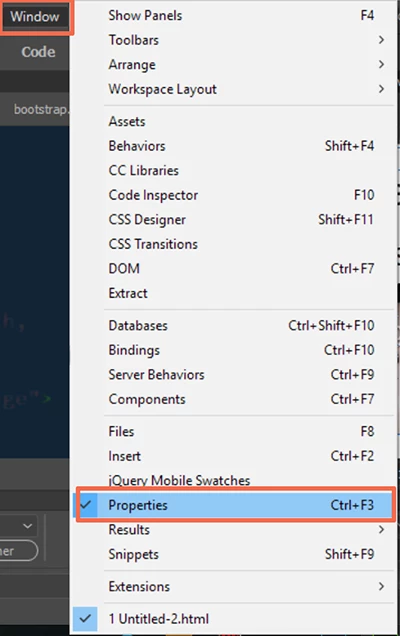
Depending on your Workspace (I customized mine) the Properties Panel can be docked on the left, right or bottom of your screen.  If you can't see it, press Ctrl+F3 or select it from the Window menu.  See screenshot.
4 replies

stevethornton
Known Participant
August 5, 2021

Thank you!


ST


Participant
July 13, 2017

Good on ya'll - but it doesn't work on mine.  It's simply a gray panel.

I wish adobe would stop breaking Dreamweaver.  i have hated every single update since CC3, and I am about to switch editors.

Jon Fritz
Community Expert
Community Expert
July 13, 2017

There's nobody forcing you to update the program, if older versions work better on your system, use them. I still have CC2015 due to some issues I've been having in 2017. The updates Adobe has pushed on 2017 fixed most of the problems I was having, but not all.

As a CC subscriber, you can have all 5 versions installed (CS6 Cloud, CC, CC2014, CC2015 and CC2017) on the same machines at the same time under a single subscription. They just won't run at the same time, so if you want to use a newer feature, you would have to close the older program first, then open the new one.

You can get older versions by going into the CC Desktop App and carefully following the instructions from this Adobe Blog:

How to Find and Install Previous Version of Adobe Apps in CC 2015 | Adobe Customer Care Team

If you're actually looking for help with your issue, and aren't simply here to vent, start a new post. Make sure to include some more details about your system, program version, workflow and issue. I'm sure one of the contributors here would be more than happy to help you get up and running.

Nancy OShea
Community Expert
Nancy OSheaCommunity ExpertCorrect answer
Community Expert
April 18, 2017

Depending on your Workspace (I customized mine) the Properties Panel can be docked on the left, right or bottom of your screen.  If you can't see it, press Ctrl+F3 or select it from the Window menu.  See screenshot.

Nancy O'Shea— Product User & Community Expert
AMiR_MN95Author
Participant
April 20, 2017

Thank you

Jon Fritz
Community Expert
Community Expert
April 18, 2017

Are you talking about the main Properties window from Window > Properties?

If so, it really hasn't changed much at all in CC2017 over CC2015.

Do you maybe have the CSS button checked on the left side of the window, but are looking for the HTML items or vise versa?


Here's CC2015...

...and here's CC2017...