Inspiring
April 5, 2017
Answered

How to get the code view text larger

  • April 5, 2017
  • 1 reply
  • 320 views

Some of my html pages in code view, are nice and large. Some are very small and hard to read. When I'm in DW, and I'm in code view and the text is small how can I see it larger?

I don't see a magnification option like you get in Word.

I'm in DW8

    This topic has been closed for replies.
    Correct answer Nancy OShea

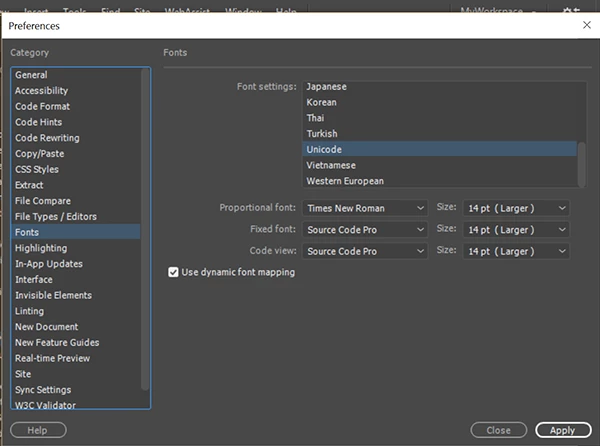
    DW 8, well that's a golden oldie.   If memory serves, I think you can change the Font sizes.  It's language specific though which means you must do it for Unicode, Western European + any others you use.

    You'll find it in Preferences > Fonts.   Below is a screenshot from the current version CC 2017.

    1 reply

    Nancy OShea
    Community Expert
    Nancy OSheaCommunity ExpertCorrect answer
    Community Expert
    April 5, 2017

    DW 8, well that's a golden oldie.   If memory serves, I think you can change the Font sizes.  It's language specific though which means you must do it for Unicode, Western European + any others you use.

    You'll find it in Preferences > Fonts.   Below is a screenshot from the current version CC 2017.

    Nancy O'Shea— Product User & Community Expert
    larry45Author
    Inspiring
    April 6, 2017

    Thanks, Nancy, did the trick. Unicode, code view, made 14 was at 7