


exhibitorm99666455
Inspiring
May 29, 2017
Answered

How to get the 'Ctrl + F' dialog box [was: A Dreamweaver Request]

  • May 29, 2017
  • 3 replies
  • 629 views

In Dreamweaver, I used to be able to hit Ctrl + F and get a dialog box to replace, with the option to change it in the text, or the source code. There is no longer that option in an easy-to-see way. I have no idea if there's now a different way to do it, or they got rid of that once-simple option.

I also used to be able to change keyboard shortcuts with ease. Now it's nearly impossible.

Could you people stop messing with this program? I'm spending a LOT of money on this program and you are slowing my workflow down. What you're calling improvements are only obstacles.

This topic has been closed for replies.
Correct answer Niharika Jha

Hi,

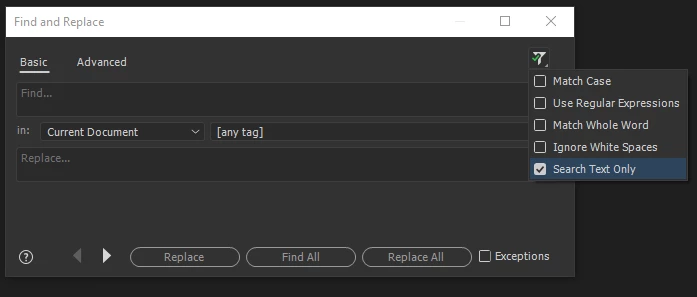
As per the new update of Dw CC 17.1, we have "Search Text only" filter option to make a Design View search from the Advanced Find and Replace dialog- invoked through Ctrl+Shift+F. Please find the snapshot attached for reference-

For the issue with keyboard shortcuts, can you please detail us more?

Regards,

Niharika Gupta

Adobe Dreamweaver

3 replies

exhibitorm99666455
Inspiring
May 30, 2017

Meh... too complicated and completely unnecessary for everyday workhorses like myself. I decided to revert back to version 2015.

Niharika Jha
Adobe Employee
Niharika JhaCorrect answer
Adobe Employee
May 30, 2017

Hi,

As per the new update of Dw CC 17.1, we have "Search Text only" filter option to make a Design View search from the Advanced Find and Replace dialog- invoked through Ctrl+Shift+F. Please find the snapshot attached for reference-

For the issue with keyboard shortcuts, can you please detail us more?

Regards,

Niharika Gupta

Adobe Dreamweaver

Rob Hecker2
Legend
May 29, 2017

Ctrl-shift-f will present a window with more options. Click the funnel with the green check to see the option for search text only.