Participant
February 5, 2018
Answered

how to include bootstrap buttons within a Dreamweaver designed web site

  • February 5, 2018
  • 2 replies
  • 2332 views

FRom an alamr when loadin my page on Dreamwever application, I understood that the past flash player buttons I positioned with my old web site designed and still maintained today with Dreamweaver CC are no more available and I have to replace them anyway since new browsers do not accept them.

I also discovered that Bootstrap buttons are an easy answer to recreate similar buttons;

I cannot find the whole detailed process that I have to follow  to implement  Bootstrap buttons within my Dreamweaver application so that I can pick them up and position them with their properties (ex links when you doubleclick on them) as I did when using the flash player buttons without writing any lines of HTML code

Where could  I find these instructions ?

Thank you.

This topic has been closed for replies.
Correct answer Nancy OShea

Bootstrap is included in the current versions of DW CC.

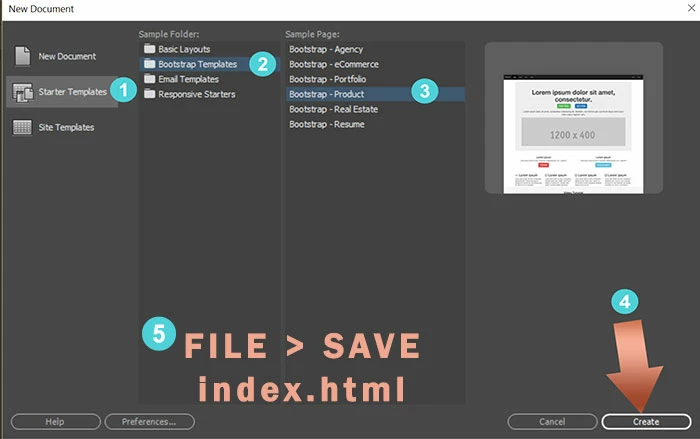
Go to File > New > Starter Templates > Bootstrap Templates.  Pick a layout and hit Create button.  See screenshots.

After saving & naming your document, DW adds Bootstrap & jQuery assets to your local site.

Or you can use Bootstrap & jQuery scripts from the CDNs. as I did above.

2 replies

Legend
February 5, 2018

It's a bit overkill to include the Bootstrap framework/libraries simply just to deploy some buttons? You could make a custom Bootstrap css stylesheet which just included the button css styles if buttons is all that you require.

Participant
February 6, 2018

Thanks a lot,

That's what I thought I should do, but what I do not know is how from start  to download from bootstrap the necessary tools to make them available within Dreamweaver.

Nancy OShea
Community Expert
Nancy OSheaCommunity ExpertCorrect answer
Community Expert
February 6, 2018

Bootstrap is included in the current versions of DW CC.

Go to File > New > Starter Templates > Bootstrap Templates.  Pick a layout and hit Create button.  See screenshots.

After saving & naming your document, DW adds Bootstrap & jQuery assets to your local site.

Or you can use Bootstrap & jQuery scripts from the CDNs. as I did above.

Nancy O'Shea— Product User & Community Expert
Nancy OShea
Community Expert
Community Expert
February 5, 2018

Bootstrap is a framework for rebuilding your web site responsively.   If your current site contains Bootstrap and jQuery, adding buttons is easy.   Below I have used Pills with contextual classes to make a simple menu.

Copy & paste this code into a new, blank document.

<!doctype html>

<html lang="en">

<head>

<meta charset="utf-8">

<title>Bootstrap Centered Pills</title>

<meta charset="utf-8">

<meta http-equiv="X-UA-Compatible" content="IE=edge">

<meta name="viewport" content="width=device-width, initial-scale=1">

<!-- Compiled & minified Bootstrap + Superhero Theme CSS-->

<link href="https://maxcdn.bootstrapcdn.com/bootswatch/3.3.7/superhero/bootstrap.min.css" rel="stylesheet" integrity="sha384-Xqcy5ttufkC3rBa8EdiAyA1VgOGrmel2Y+wxm4K3kI3fcjTWlDWrlnxyD6hOi3PF" crossorigin="anonymous">

<style>

.centered-pills {

    text-align: center;

    font-size: 2rem;

}

/**change stacked nav to horizontal on md-lg displays**/

@media (min-width: 768px) {

.nav-stacked > li { display: inline-block; }

.nav-stacked > li + li {

    margin-top: 0;

    margin-left: 2px;

}

}

</style>

</head>

<body>

<div class="container">

<div class="row">

<h1 class="text-center">Bootstrap Pills Demo</h1>

<nav class="centered-pills">

<ul class="nav nav-pills nav-stacked">

<li class="active"><a href="#">Home</a></li>

<li class="dropdown"><a class="dropdown-toggle btn-success" data-toggle="dropdown" href="#">Menu 1 <span class="caret"></span></a>

<ul class="dropdown-menu">

<li><a href="#">Submenu 1-1</a></li>

<li><a href="#">Submenu 1-2</a></li>

<li><a href="#">Submenu 1-3</a></li>

</ul>

</li>

<li><a class="btn-default" href="#">Menu 2</a></li>

<li><a class="btn-info" href="#">Menu 3</a></li>

<li><a class="btn-warning" href="#">Menu 4</a></li>

<li><a class="btn-danger" href="#">Menu 5</a></li>

</ul>

</nav>

</div>

<!--/row-->

</div>

<!--/container-->

<!--Latest compiled & minified jQuery 3 JS-->

<script src="https://code.jquery.com/jquery-3.2.1.min.js" integrity="sha256-hwg4gsxgFZhOsEEamdOYGBf13FyQuiTwlAQgxVSNgt4=" crossorigin="anonymous"></script>

<!--Latest compiled & minifed Bootstrap JS-->

<script src="https://maxcdn.bootstrapcdn.com/bootstrap/3.3.7/js/bootstrap.min.js" integrity="sha384-Tc5IQib027qvyjSMfHjOMaLkfuWVxZxUPnCJA7l2mCWNIpG9mGCD8wGNIcPD7Txa" crossorigin="anonymous">

</body>

</html>

Nancy O'Shea— Product User & Community Expert