meaghanm60433811
Participant
March 4, 2019
Answered

How to make a very simple web page with just a dynamic image—nothing else.

  • March 4, 2019
  • 2 replies
  • 1151 views

Hi there,

I haven't designed a web site using Dreamweaver for at least ten years. What I want to do is so simple, but I can't find a template for it. I just want to build a web site with a JPEG in the background that will look proportional on mobile devices and desktops. No text, no links—nothing except the image. Can anyone point me to a simple template that will accomplish that? Thank you!

This topic has been closed for replies.
Correct answer Nancy OShea

meaghanm60433811  wrote

I just want to build a web site with a JPEG in the background that will look proportional on mobile devices and desktops. No text, no links—nothing except the image.

No content means it's invisible to search engines, screen readers and language translators.  Apart from the obvious accessibility problems,  a lack of real HTML content = no traffic to your website except what you pay for in keyword ads. 
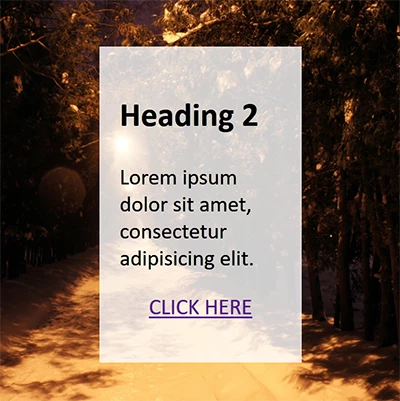
Copy & paste this code into a new, blank document in Code View.

SaveAs test.html and preview in browsers and mobile devices.

<!doctype html>

<html lang="en">

<head>

<meta charset="utf-8">

<title>Background-Size Cover Demo</title>

<meta name="viewport" content="width=device-width, initial-scale=1">

<meta http-equiv="X-UA-Compatible" content="IE=edge">

<style>

body, html {

margin: 0;

padding: 0;

height: 100%;

display: flex;

align-items: center;

justify-content: center;

}

body {

background: url(https://placeimg.com/900/900/nature) center center fixed;

background-size: cover

}

.container {

width: 40%;

margin: 0 auto;

padding: 5%;

background: rgba(255,255,255,0.8);

}

.center { text-align: center }

</style>

</head>

<body>

<div class="container">

<h2>Heading 2</h2>

<p>Lorem ipsum dolor sit amet, consectetur adipisicing elit.</p>

<p class="center"><a href="https://example.com" class="button">CLICK HERE</a></p>

</div>

</body>

</html>

Good luck with your project!

2 replies

Nancy OShea
Community Expert
Nancy OSheaCommunity ExpertCorrect answer
Community Expert
March 4, 2019

meaghanm60433811  wrote

I just want to build a web site with a JPEG in the background that will look proportional on mobile devices and desktops. No text, no links—nothing except the image.

No content means it's invisible to search engines, screen readers and language translators.  Apart from the obvious accessibility problems,  a lack of real HTML content = no traffic to your website except what you pay for in keyword ads. 

Copy & paste this code into a new, blank document in Code View.

SaveAs test.html and preview in browsers and mobile devices.

<!doctype html>

<html lang="en">

<head>

<meta charset="utf-8">

<title>Background-Size Cover Demo</title>

<meta name="viewport" content="width=device-width, initial-scale=1">

<meta http-equiv="X-UA-Compatible" content="IE=edge">

<style>

body, html {

margin: 0;

padding: 0;

height: 100%;

display: flex;

align-items: center;

justify-content: center;

}

body {

background: url(https://placeimg.com/900/900/nature) center center fixed;

background-size: cover

}

.container {

width: 40%;

margin: 0 auto;

padding: 5%;

background: rgba(255,255,255,0.8);

}

.center { text-align: center }

</style>

</head>

<body>

<div class="container">

<h2>Heading 2</h2>

<p>Lorem ipsum dolor sit amet, consectetur adipisicing elit.</p>

<p class="center"><a href="https://example.com" class="button">CLICK HERE</a></p>

</div>

</body>

</html>

Good luck with your project!
Nancy O'Shea— Product User & Community Expert
ALsp
Legend
March 4, 2019

How can you give the person a solution without knowing more details? This is not a good answer, Nancy. It's a guess. Patience :-)

Nancy OShea
Community Expert
Community Expert
March 4, 2019

Based on what we know (which I admit  isn't much), my reply answers the immediate question of how to create a responsive background image.

Meanwhile we wait for the OP to come back with more info....

https://i1.kym-cdn.com/photos/images/facebook/000/592/253/714.jpg

Nancy O'Shea— Product User & Community Expert
ALsp
Legend
March 4, 2019

You don't need a template. What you need is to explain exactly how you want the image to render: contained, or completely covering the viewport. Finally, you need to provide the exact dimensions of the image. In fact, if you post the image, someone can do a quick example page for you.
