Participant
November 2, 2017
解決済み

How to make an unordered list border with two sharp edges?

  • November 2, 2017
  • 返信数 1.
  • 685 ビュー

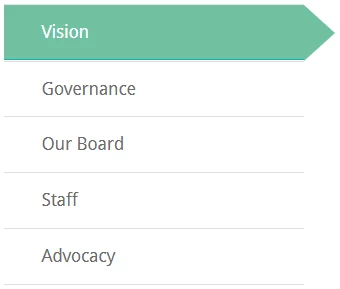
How to make an unordered list border with sharp edges like this? When the current page is active or the text is hover, the color of text and background change, and the border become two sharp edges.

Here is the code I have done so far:

                    <ul>

                    <li><a href="Vision" class="active">Vision</a></li>


                    <li><a href="Governance">Governance</a></li>

                    <br>

                    <li><a href="Our Board">Our Board</a></li>

                    <br>

                    <li><a href="Staff">Staff</a></li>

                    <br>

                    <li><a href="Advocacy">Advocacy</a></li>

                    </ul>

このトピックへの返信は締め切られました。
解決に役立った回答 osgood_

See if the below works for you. I don't believe this or the code on the wesbite example you provided is the brightest solution in the box to use because if you zoom the text the whole thing starts to breaks down. Probably produced by some designer without any consideration for end users text sizing.

<!DOCTYPE>

<html>

<head>

<meta charset="UTF-8" />

<title>Arrow Anchor Tag</title>

<style>

body {

font-family: helvetica, sans-serif;

}

nav {

width: 25%;

}

nav ul {

margin: 0;

padding: 0;

}

nav li {

margin: 0;

padding: 0;

border-bottom: 1px solid #ccc;

list-style: none;

}

nav a {

margin: 0;

position: relative;

padding: 18px 20px;

display: block;

text-decoration: none;

color: #666;

}

nav a:hover {

background: #70C1A0;

color: #fff;

}

/* ARROW */

nav a:hover:after {

content: '';

display: block;

position: absolute;

left: 100%;

width: 0;

height: 0;

border-style: solid;

}

nav a:hover:after {

top: 0;

border-color: transparent transparent transparent #70C1A0;

border-width: 26px;

}

/* ACTIVE TAB */

.active a {

background-color: #70C1A0;

color: #fff;

}

.active a:after {

content: '';

display: block;

position: absolute;

left: 100%;

width: 0;

height: 0;

border-style: solid;

top: 0;

border-color: transparent transparent transparent #70C1A0;

border-width: 26px;

}


</style>

</head>

<body>

<nav>

<li><a href="#">Vision</a></li>

<li class="active"><a href="#">Governance</a></li>

<li><a href="#">Our Board</a></li>

<li><a href="#">Staff</a></li>

<li><a href="#">Advocacy</a></li>

</nav>

</body>

</html>

返信数 1

BenPleysier
Community Expert
Community Expert
November 2, 2017

If you give us the location of the webpage from where you got the image, we may be able to help you

Wappler is the DMXzone-made Dreamweaver replacement and includes the best of their powerful extensions, as well as much more!
hhc85709902作成者
Participant
November 2, 2017

Attached is the website that have the above image. Thanks.

https://lungfoundation.com.au/about-us/mission/

osgood_解決!
Legend
November 2, 2017

See if the below works for you. I don't believe this or the code on the wesbite example you provided is the brightest solution in the box to use because if you zoom the text the whole thing starts to breaks down. Probably produced by some designer without any consideration for end users text sizing.

<!DOCTYPE>

<html>

<head>

<meta charset="UTF-8" />

<title>Arrow Anchor Tag</title>

<style>

body {

font-family: helvetica, sans-serif;

}

nav {

width: 25%;

}

nav ul {

margin: 0;

padding: 0;

}

nav li {

margin: 0;

padding: 0;

border-bottom: 1px solid #ccc;

list-style: none;

}

nav a {

margin: 0;

position: relative;

padding: 18px 20px;

display: block;

text-decoration: none;

color: #666;

}

nav a:hover {

background: #70C1A0;

color: #fff;

}

/* ARROW */

nav a:hover:after {

content: '';

display: block;

position: absolute;

left: 100%;

width: 0;

height: 0;

border-style: solid;

}

nav a:hover:after {

top: 0;

border-color: transparent transparent transparent #70C1A0;

border-width: 26px;

}

/* ACTIVE TAB */

.active a {

background-color: #70C1A0;

color: #fff;

}

.active a:after {

content: '';

display: block;

position: absolute;

left: 100%;

width: 0;

height: 0;

border-style: solid;

top: 0;

border-color: transparent transparent transparent #70C1A0;

border-width: 26px;

}


</style>

</head>

<body>

<nav>

<li><a href="#">Vision</a></li>

<li class="active"><a href="#">Governance</a></li>

<li><a href="#">Our Board</a></li>

<li><a href="#">Staff</a></li>

<li><a href="#">Advocacy</a></li>

</nav>

</body>

</html>