thierryv29121924
Participant
May 18, 2017
Answered

How to make subpages with Dreamweaver 2017.1?

  • May 18, 2017
  • 1 reply
  • 1904 views

Hi,

I would like to know how to make subpages with Dreamweaver 2017.1 in order to get URLs of type:http://domain name / first level page / second page level page / etc..

Thanks

Thierry

    This topic has been closed for replies.
    Correct answer Nancy OShea

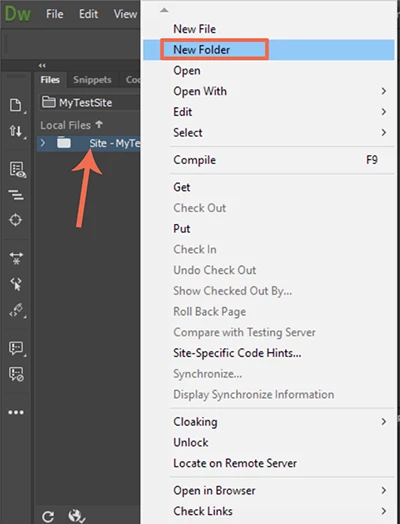
    In your Files Panel (Ctrl+F3), right-click on your Site Name to create a new folder.

    You may click and drag Files Panel items into folders or sub-folders.

    1 reply

    Jon Fritz
    Community Expert
    Community Expert
    May 18, 2017

    Do you mean without a trailing .html at the end?

    You can do that a couple ways, depending on the size of the site. For larger sites, re-writing the urls by modifying the .htaccess file on your server is best.

    On a small site, you could set it up so every page after the home page has its own folder, like so...

    RootFolder
         index.html (home page)
         contact
              index.html (shows as www.domain.com/contact)
         about
              index.html (shows as www.domain.com/about)
         services
              index.html (shows as www.domain.com/services)

    The main issue with doing it this way is if the site gets large, accidents can happen when all of the pages are named index.html.

    thierryv29121924
    Participant
    May 23, 2017

    Hi Jon,

    Thank you for your answer, nice to you to take time for my problem.

    Sorry for my English but i'm french.

    The purpose is to create a hierarchy in the pages of the site in order to get pages of different levels so that the URLs appear in browsers for example in the following way:
    Http: // domain name / home / categories / product detail.html

    Some web editors allow you to create pages by asking if this new page depends on a top page, but I can not find this function in Dreamweaver.

    I was suggested to create directories to create the hierarchy of the site, but I do not know how to do it

    I'm self-taught and it's not always obvious to me to understand the explanations and realize them, so I often need concrete examples as well as the different sequences to follow.

    Than you again

    Thierry

    Jon Fritz
    Community Expert
    Community Expert
    May 23, 2017

    In this context, directories are just folders on your hard drive that DW manages for you. When you create your site, your home page is in your site's root folder (root directory)...

    SiteRoot

         index.html

    In order to create "sub-directories" all you do is create new folders within the site root with the names you want to use...

    SiteRoot

         index.html

         categories

              category1

              category2

                   subcategory2

    ...then populate the folders with pages...

    SiteRoot

         index.html

         categories

              category1

                   category1.html

              category2

                   category2.html

                   subcategory2

                        subcategory2.html

    In Dreamweaver, you can right click in the Files window (Window > Files or F8 if it's not open) and choose New Folder to create a new sub-directory. You can then click and drag the folder into any other folder to create paths like the one you show above.