


Participant
September 23, 2017
Answered

How to stop text "flowing" up past the bottom of a photo?

It’s been a long time since I built a website and I’m very, very rusty. Hopefully someone can help with this simple problem.

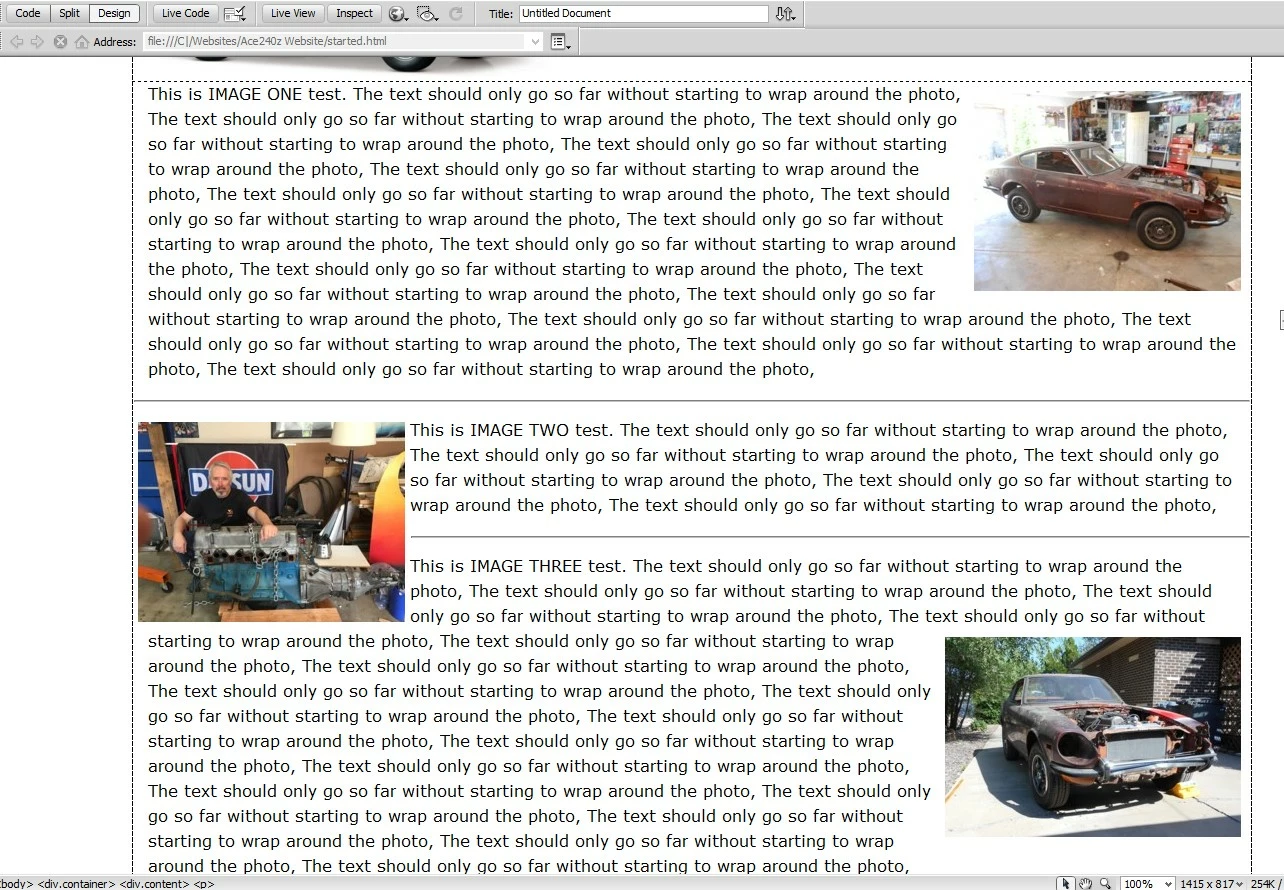
I’m creating a page of photos and text for a “work in progress” website. The photos will float left or right, and beside each photo will be text. I want the text to wrap below the photo when needed, which is what I already have and it works just fine

Here's the problem: "IMAGE TEST one" works, but having a smaller amount of text, as with "IMAGE TEST two," the text from the paragraph beneath it flows upward. How do I prevent that from happening?

Many thanks!
    This topic is closed to new replies. Start a new post to keep the conversation going.
    Nancy OShea
    Nancy OSheaCorrect answer
    Community Expert
    September 24, 2017

    Answers to layout questions are contained in your code.  Without much to go on,  I'm guessing you used CSS floats but you didn't clear them.

    CSS Layout - float and clear

    Nancy

    Nancy O'Shea— Product User & Community Expert

    1 reply

    Nancy OShea
    Community Expert
    Nancy OSheaCommunity ExpertCorrect answer
    Community Expert
    September 24, 2017

    Answers to layout questions are contained in your code.  Without much to go on,  I'm guessing you used CSS floats but you didn't clear them.

    CSS Layout - float and clear

    Nancy

    Translate
    Nancy O'Shea— Product User & Community Expert
