


Participating Frequently
February 10, 2018
Answered

How to use DreamWeaver to improve my work?

  • February 10, 2018
  • 4 replies
  • 986 views

Hello dear Users,

i started coding with a worldpad, the first few days.

A friend of mine, told me about notepad++ and i used it for few years. Since few months i was using Atom Editor.

I took a look at Adobe Muse but, it doesn't give me enough freedom while coding.

I just found out about DreamWeaver today, i didn't really look at all programs. I mostly only use, Photoshop, Premiere and Illustrator.

What i have done in DreamWeaver, i've imported my folder where i used to keep my coded websites, i also setup a testserver using my FTP connection.

I have no idea what "buttons" do what. I would also like some visual editing like in Muse, i want to speed up that positioning part by using visual editing.

I know CSS1/2/3, there is very little that i might "not know" in CSS or i never needed it. I would like to use Visual Editing in BW for such things like positioning etc.

Can you give me some infos, tips? So far the only difference i see now is, that i have a preview on my Phone and my browser, this is pretty cool but i think there is more right?
    This topic has been closed for replies.
    Correct answer anissa_thompson

    What i have done in DreamWeaver, i've imported my folder where i used to keep my coded websites, i also setup a testserver using my FTP connection.

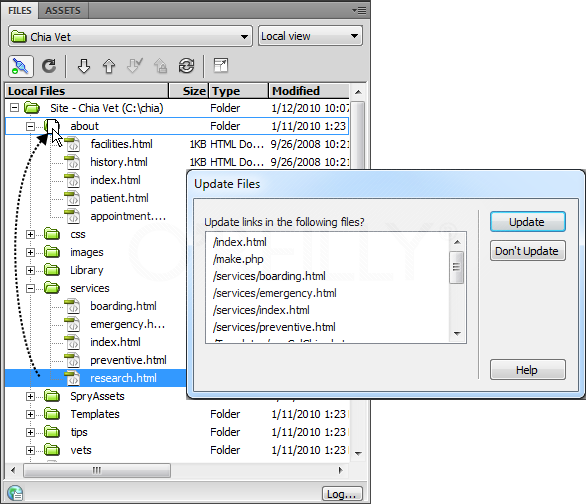
    One thing that you'll find Dreamweaver exceptionally helpful with, given that you have older existing websites, is file management for your folder structures. As long as you have each project in its own folder and set up a separate Site Definition for each when you begin updating and moving files around, Dreamweaver will help you stay organized by notifying you regarding potential broken links:

    I_mediaobject1_d1e45157-web.png

    I have no idea what "buttons" do what. I would also like some visual editing like in Muse, i want to speed up that positioning part by using visual editing.

    I know CSS1/2/3, there is very little that i might "not know" in CSS or i never needed it. I would like to use Visual Editing in BW for such things like positioning etc.

    I suspect that in order to bring some of your projects "up to code" [pun intended] regarding responsive layout, you may need strip out some/most of your old markup before applying a framework like Bootstrap. If you're not sure what to expect, spend a little time perusing the tutorials BenPleysier provided above, and get comfortable with RD basics like on W3Schools.com Responsive Web Design Introduction.

    4 replies

    anissa_thompson
    Community Expert
    anissa_thompsonCommunity ExpertCorrect answer
    Community Expert
    February 12, 2018

    What i have done in DreamWeaver, i've imported my folder where i used to keep my coded websites, i also setup a testserver using my FTP connection.

    One thing that you'll find Dreamweaver exceptionally helpful with, given that you have older existing websites, is file management for your folder structures. As long as you have each project in its own folder and set up a separate Site Definition for each when you begin updating and moving files around, Dreamweaver will help you stay organized by notifying you regarding potential broken links:

    I_mediaobject1_d1e45157-web.png

    I have no idea what "buttons" do what. I would also like some visual editing like in Muse, i want to speed up that positioning part by using visual editing.

    I know CSS1/2/3, there is very little that i might "not know" in CSS or i never needed it. I would like to use Visual Editing in BW for such things like positioning etc.

    I suspect that in order to bring some of your projects "up to code" [pun intended] regarding responsive layout, you may need strip out some/most of your old markup before applying a framework like Bootstrap. If you're not sure what to expect, spend a little time perusing the tutorials BenPleysier provided above, and get comfortable with RD basics like on W3Schools.com Responsive Web Design Introduction.

    Hope this helps! Make sure to press "✔ Correct Answer" on this post if this answers your question. Happy Creating!Anissa • @anissat
    rayek.elfin
    Legend
    February 11, 2018

    DreamWeaver is a coding editor with built-in FTP and file management options, with some visual editing support. The browser and phone view option is built into many other editors as well, and nothing out of the ordinary. As a matter of fact, with a couple of external tools any code editor could be doing that too.

    Muse is a purely visual tool, and the code it produces is horrendously bad. Good for prototyping, though, and for designers who don't want to or lack the time to learn html and css.

    After reading your post, I suppose Atom + PineGrow might be the answer you're looking for.

    Nancy OShea
    Community Expert
    Community Expert
    February 10, 2018

    DamianToczek  wrote

    I have no idea what "buttons" do what. I would also like some visual editing like in Muse, i want to speed up that positioning part by using visual editing.

    DW is not a click and drag app like MU.  MU is aimed at non-coders who want click & drag ease without learning to write code.

    DW is a coders tool.  It will help you code more efficiently and allow you to see what you're doing while you work.   DW excels at site management, code hinting and auto code completion.  

    Nancy O'Shea— Product User & Community Expert
    BenPleysier
    Community Expert
    Community Expert
    February 10, 2018
    Wappler is the DMXzone-made Dreamweaver replacement and includes the best of their powerful extensions, as well as much more!