Participating Frequently
January 17, 2017
Answered

htaccess hidden?

  • January 17, 2017
  • 1 reply
  • 4933 views

Apologies if this has been answered 1,000,000 times before...

How do I make htaccess files visible in the latest version of Dreamweaver? Why do they seem to be hidden by default?

Thanks

    This topic has been closed for replies.
    Correct answer Jon Fritz

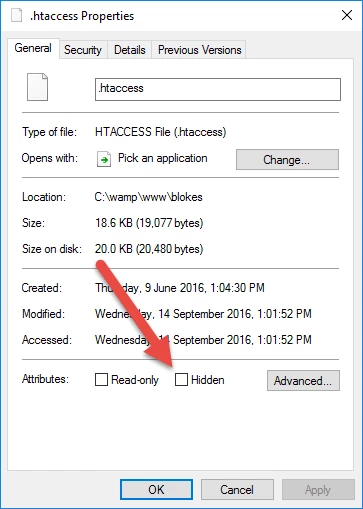
    Go to to file in Filemanager, right click the file, choose properties and unclick Hidden


    To see all of the hidden files mixed into your site (including the DW _notes folders all over the place), you need to turn them on in the Files window...

    1. In the Files window, click the small menu icon in the upper right
    2. Choose View
    3. Select Show Hidden Files to place a checkmark by it
    4. Refresh the Files window by clicking the Refresh button, located in the bottom left in CC2017

    In Windows, .htaccess files should show without needing to turn on the option, at least in my W7 they're not hidden files. I'm not sure if enabling hidden files on a Mac is enough to make them appear in DW. The above should do it either way.

    1 reply

    BenPleysier
    Community Expert
    Community Expert
    January 17, 2017

    They are not hidden by Dreamweaver, but by your operating system

    Wappler is the DMXzone-made Dreamweaver replacement and includes the best of their powerful extensions, as well as much more!
    Participating Frequently
    January 17, 2017

    Is there nothing I can do to make them visible? I used to be able to make them visible in older versions of DW but I can't find out how in the newer versions.

    Legend
    January 17, 2017

    put a period/full-stop infront of them .htaccess

    Edited:

    put an underscore infront of them _htaccess if you are working locally and want to open them in DW.