


misskuma
Participant
August 26, 2024
Question

html template not showing up in Dreamweaver...

  • August 26, 2024
  • 4 replies
  • 242 views

Hi everyone. I hope I am posteing this in the right place.

I purchased an html template via Envato a few years back but it has never displayed correctly in the dreamwever. Coding itself is fine but visual is not at all usable. See attachment. I contacated the author (ThemeREx ) and she told me to ask the Adobe. 

So has anyone had any issues like this and if so how can I fix it so that I can actually SEE what I am doing! 

This is how the home page is displaying. Mostly blank!
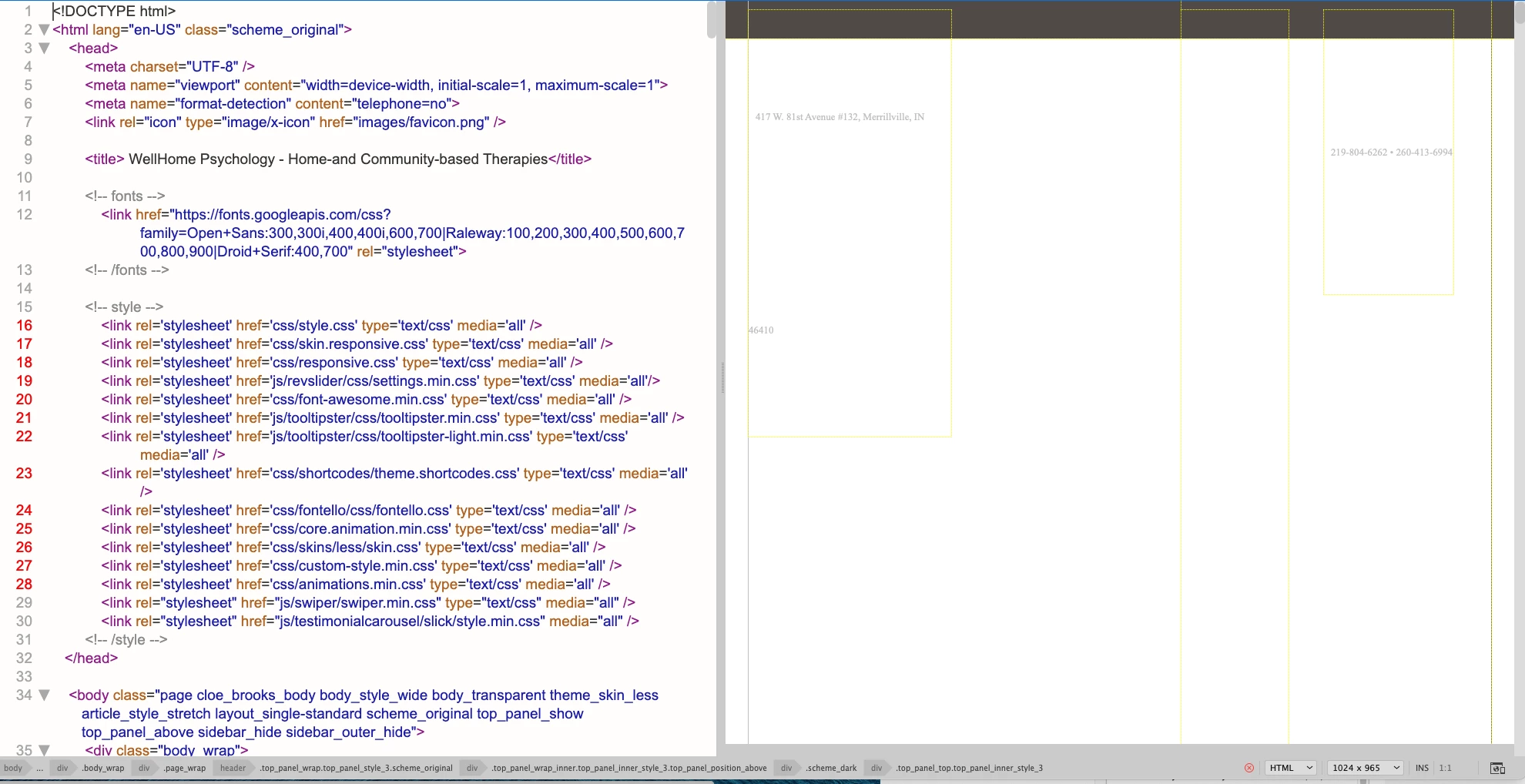
Curious to know if this is a Dreamweaver issue of theme issue.

Thank you!

    This topic has been closed for replies.

    4 replies

    BenPleysier
    Community Expert
    Community Expert
    August 27, 2024

    As @Nancy OShea has stated, there is a red cross meaning that there are problems with the code. Another indication that there is something wrong, are the red coloured line numbers as in


    This may indicate that the relevant stylesheets cannot be found in the specified location. 


    In other words, Dreamweaver is not the problem while giving enough clues to help you with problems caused by other factors.


    Wappler is the DMXzone-made Dreamweaver replacement and includes the best of their powerful extensions, as well as much more!
    Nancy OShea
    Community Expert
    Community Expert
    August 27, 2024

    Also, you have a RED X showing which denotes code validation errors in your HTML document.

    Identify & fix those errors first.  Window > Results > Validation... check document.


    Nancy O'Shea— Product User & Community Expert
    Nancy OShea
    Community Expert
    Community Expert
    August 26, 2024

    Are the site files saved to a defined local site folder on your primary hard drive?  Eg. C:\MySite\

    Can you see pages in your local browser?


    Nancy O'Shea— Product User & Community Expert
    Community Expert
    August 26, 2024

    Is that design view or live view? If design view, switch to live view and see if you still have the same issue.