Known Participant
August 13, 2019
Answered

Hyperlink in image in DW-2019

  • August 13, 2019
  • 4 replies
  • 438 views

In the older versions of Dreamweaver I could select an image, and then in the property inspector insert a link to another page. It doesn't work in the newest DW. If I stay in the same folder, there is no problem, but when I try to browse to another folder, the property inspector shuts down.

'Insert -> hyperlink' is not handy, it makes a text and the link sits next to the image instead of in it. I have to cut the <a href etc, paste it where I want it and delete what I don't need. Since it is an art webshop I have to link images all the time.

Is it a glitch in 'my' DW-2019 or is there in the newer versions a different way to link images?

Any help appreciated

    This topic has been closed for replies.
    Correct answer BenPleysier

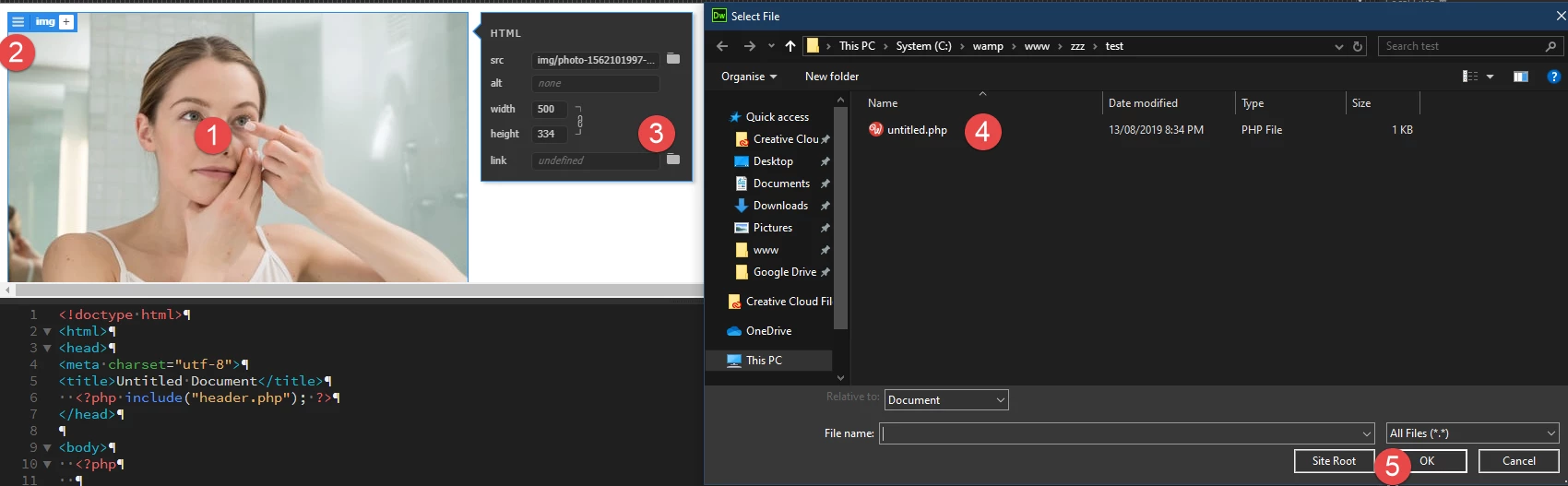
    I am assuming that you are in Live view. The way to attach a link to the image is to click the image -> Edit HTML Attributes -> browse for file as per:

    4 replies

    HeyliseAuthor
    Known Participant
    August 15, 2019

    Ben Pleysier, THANKS! This works.

    But I am also going to fix code errors, recommended by Nancy, because I think a lot of what causes trouble is due to this kind of mess.

    I started this website ages ago in Frontpage, then had to switch to Dreamweaver, doing my best to make it more or less working with my limited knowledge. Then the mobiles came, and I had to change the whole thing to responsive.

    Of course it is riddled with error codes. I cleaned up a lot, but there are close to 2000 pages, and time has a habit to move on...

    So I should have checked Nancy's answer as 'correct answer' as well, but it is rather a universally correct answer. Going to like it and also check the 'helpful' - thanks to you too, Nancy!

    Nancy OShea
    Community Expert
    Community Expert
    August 13, 2019

    Did you define your local site folder before you began this project? 

    Is your site folder on your primary hard drive?

    And are all your project files located in the site folder?

    Nancy O'Shea— Product User & Community Expert
    Nancy OShea
    Community Expert
    Community Expert
    August 13, 2019

    Linking images works the same as it always has. 

    Code errors can cause DW to act up.  Validate your code and fix reported errors.  See screenshots.

    Nancy O'Shea— Product User & Community Expert
    BenPleysier
    Community Expert
    BenPleysierCommunity ExpertCorrect answer
    Community Expert
    August 13, 2019

    I am assuming that you are in Live view. The way to attach a link to the image is to click the image -> Edit HTML Attributes -> browse for file as per:

    Wappler is the DMXzone-made Dreamweaver replacement and includes the best of their powerful extensions, as well as much more!