Participant
October 1, 2019
Answered

Hyperlinks to PDFs

  • October 1, 2019
  • 1 reply
  • 222 views

Hola buenas tardes.


Soy nuevo en dreamweaver y quiero subir archivos PDF a mi web, me pueden orientar para saber que pasos seguir y así darle a mis clientes lo ya mencionado.


Muchas gracias

Saludos

    This topic has been closed for replies.
    Correct answer Nancy OShea

    I have branched this question to a new discussion for you. 

    1. Define a local site folder for your project.
    2. Move PDF files to your local site folder.
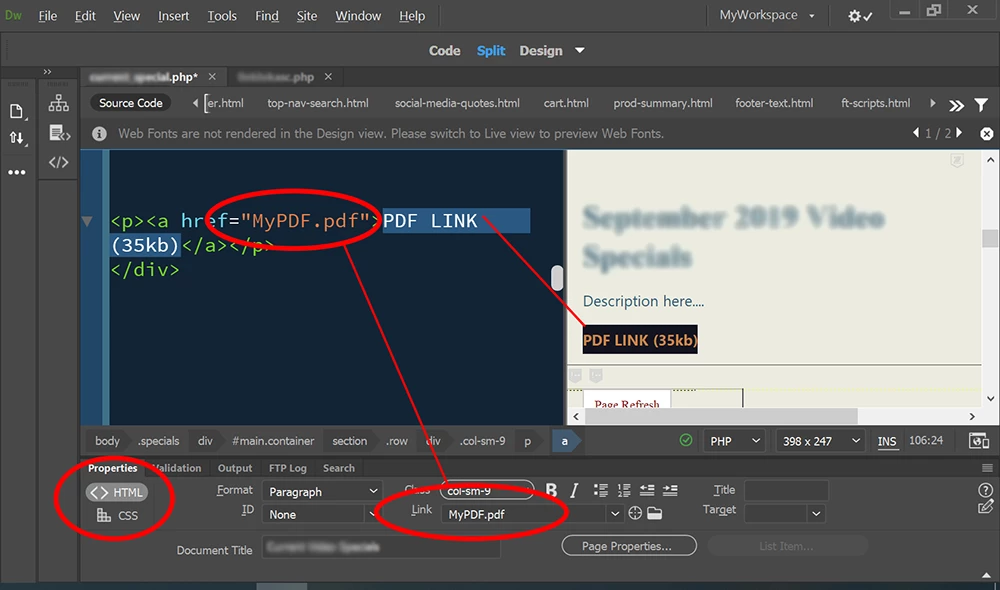
    3. Type some text in your HTML document and highlight it.
    4. Go to the link field in your HTML Properties Pane.
    5. Browse or type the path & name of your PDF file.   See screenshot. 


    1 reply

    Nancy OShea
    Community Expert
    Nancy OSheaCommunity ExpertCorrect answer
    Community Expert
    October 1, 2019

    I have branched this question to a new discussion for you. 

    1. Define a local site folder for your project.
    2. Move PDF files to your local site folder.
    3. Type some text in your HTML document and highlight it.
    4. Go to the link field in your HTML Properties Pane.
    5. Browse or type the path & name of your PDF file.   See screenshot. 


    Nancy O'Shea— Product User & Community Expert