Participant
November 29, 2018
Answered

I can't set up connection between Dreamweaver and the publishing server

  • November 29, 2018
  • 2 replies
  • 491 views

Hi dear

I followed the steps below

Select Site > Manage Sites.

  •    


In the Site Setup dialog box, select the Servers category and do one of the following:


  • Click the Add New Server button to add a new server.
  • Select an existing server and click the Edit Existing Server button.


Here is a sample Server set up screen showing the basic setup options with the text fields populated.

But I encountered the following error

HTTP Error Code 404 File Not Found

Thank you for solving my problem

This topic has been closed for replies.
Correct answer Nancy OShea

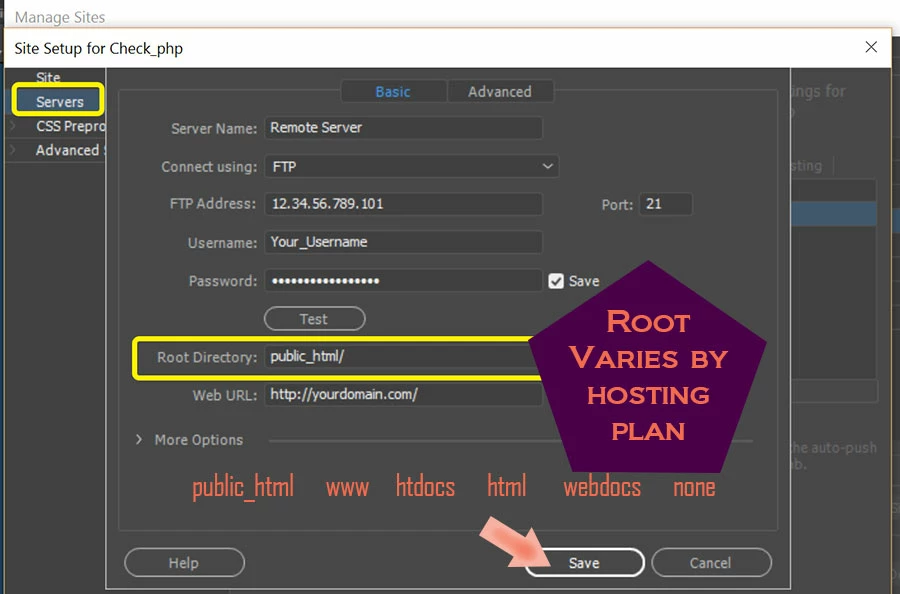
See screenshot.   Your server set-up should resemble this.  If unsure which credentials to use, ask  your web hosting provider.

2 replies

Nancy OShea
Community Expert
Nancy OSheaCommunity ExpertCorrect answer
Community Expert
December 1, 2018

See screenshot.   Your server set-up should resemble this.  If unsure which credentials to use, ask  your web hosting provider.

Nancy O'Shea— Product User & Community Expert
Preran
Community Manager
Community Manager
November 29, 2018

Your screenshot did not come through. Can you try uploading your screenshot again?

Thanks,

Preran

Participant
December 1, 2018

Is the SSL certificate related to this topic? I recently got this certificate

https://www.markazahan.com