

christineavatar
Legend
June 21, 2019
Answered

I cannot get the .img to change in the published version

  • June 21, 2019
  • 4 replies
  • 797 views

I have been changing the header .gif to a different color. I have changed the .gif in my local files Images folder. I have checked the new one in the Remote server file and it is the correct one. But what shows up on the website is the old .gif. I have turned Dreamweaver off and opened it up again but nothing seems to work. Help!

This topic has been closed for replies.
Correct answer BenPleysier

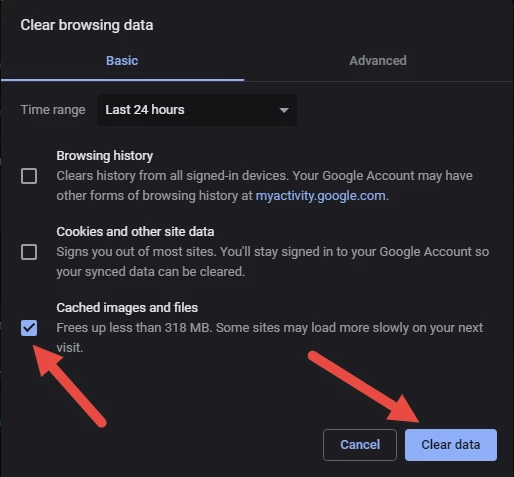
That's the browser cache doing its job. In the browser use CTRL+SHIFT+DEL to bring up the following dialog (or similar)

Make sure that cached .... is ticked and clear data. Retry the page.

4 replies

christineavatar
Legend
June 21, 2019

Thanks for the tip! I had no idea it was that important.

Jon Fritz
Community Expert
Community Expert
June 21, 2019

If I plan to have a file that is updated regularly, without changing the file name itself, I use a tiny scrap of javascript to append the file name with a query string that uses a seemingly random number (it's not random, but will never be the same) to trick the browser into thinking it's downloading a new file each time.

It's pretty simple and if for some odd reason, the user has javascript turned off, the normal link will still work. It looks like this...

<a href="pdfs/myupdated.pdf" onClick="this.href=this.href.split('?')[0]+'?'+new Date().getTime()">Click here for the updated file</a>

christineavatar
Legend
June 21, 2019

Thank you Nancy but the actual problem was solved by clearing the cache

Nancy OShea
Community Expert
Community Expert
June 21, 2019

I'm happy you're satisfied with Ben's answer.  But what about your returning site visitors?  Are they going to clear their cache to see your new banner image?   Probably not.   Using new file names avoids that problem entirely. 

Nancy O'Shea— Product User & Community Expert
christineavatar
Legend
June 21, 2019

Thank you Ben,

That did the trick!

Nancy OShea
Community Expert
Community Expert
June 21, 2019

Are you using a new file name each time you change the banner  image?.

banner_jun21_10-am.gif.

banner_jul20_1-pm.gif

Nancy O'Shea— Product User & Community Expert
BenPleysier
Community Expert
BenPleysierCommunity ExpertCorrect answer
Community Expert
June 21, 2019

That's the browser cache doing its job. In the browser use CTRL+SHIFT+DEL to bring up the following dialog (or similar)

Make sure that cached .... is ticked and clear data. Retry the page.

Wappler is the DMXzone-made Dreamweaver replacement and includes the best of their powerful extensions, as well as much more!