najux
Participant
February 25, 2017
Answered

I cannot see the preview color in css in dw 2017, please help me!

  • February 25, 2017
  • 1 reply
  • 389 views

Hello there, I've just downloaded dw 2017. In the css when I pass the mouse over a color as for example #CCCCCC, I can't see the preview color in the usual little box. In dw 2015 I could. Many friends of mine have dw 2017 and they can see the preview color, why cannot I?!

Thank you in advance

This topic has been closed for replies.
Correct answer BenPleysier

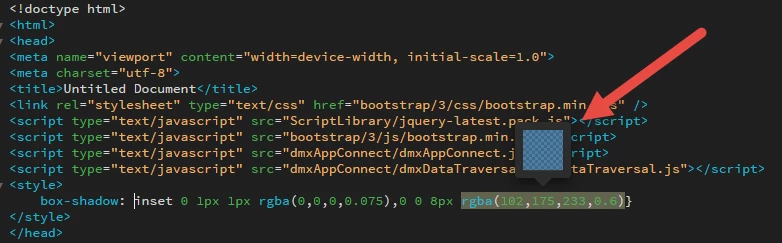
My out-of-the-box version shows the following without tweaks or mods.

I don't think there is a setting that can influence this behaviour, that is why I suggested that there may be an error in the code. Dreamweaver does not like errors.

Try placing the line in a new document and see if that works. To simplify the process for you, just copy and paste the following into your document.

<style>

  box-shadow: inset 0 1px 1px rgba(0,0,0,0.075),0 0 8px rgba(102,175,233,0.6)}

</style>

Have a good day

1 reply

BenPleysier
Community Expert
Community Expert
February 25, 2017

If Dreamweaver does not function properly, it is usually because of an error in the code. Try a new document with just the colour part and see if it still misbehaves.

Wappler is the DMXzone-made Dreamweaver replacement and includes the best of their powerful extensions, as well as much more!
najux
najuxAuthor
Participant
February 25, 2017

Hello BenPleysier,

it's not about code...i'm referring to a task that dw 2015 had...the preview color when you pass your mouse on it. Let me be clearer :  If you don't remember #CCCCCC what color is, you have to put the mouse on the text "#CCCCCC" and the software lets me see a little(grey in this case) box on top the text. This function isn't in my dw 2017, but i'm sure is in a regular dw 2017. I think it's some kind of setting that I have to flag, maybe in the preferences menu. But I don't know wich is it and where I can find it.

Tnks for your comment anyway

Nancy OShea
Community Expert
Community Expert
February 25, 2017

It works fine for me.  No preference settings required.

The new Dreamweaver does not like code errors.

Are you working with a valid CSS document? 

Did you check your CSS code for errors? 

The W3C CSS Validation Service

Nancy

Nancy O'Shea— Product User & Community Expert