Participating Frequently
March 16, 2018
Answered

I have CS5 and I don't know how to implement the SSL certificate

  • March 16, 2018
  • 2 replies
  • 2718 views

Years ago I created my business website using Dreamweaver CS5. I've purchased an SSL certificate and my website host now tells me I have work to do my end in order to finish the implementation. I have absolutely no idea how to do this and I'm not finding anything when I try to search for an answer online. My web address is http://www.heritageceilings.com.au .

Could some dear soul please help me?  I'm not very smart with technical things so simple terminology will be most appreciated.

Thanks in advance.

    This topic has been closed for replies.
    Correct answer BenPleysier

    So, plan of action is to save a copy of the website and keep it elsewhere on my computer in case it is needed. Then make a decision on whether to make everything an absolute path or a relative path.  Proceed to change everything over making sure not to make changes to  links to other folks websites by accident. I think I'll use Find and Replace on each page after I've checked for any links to outside websites.

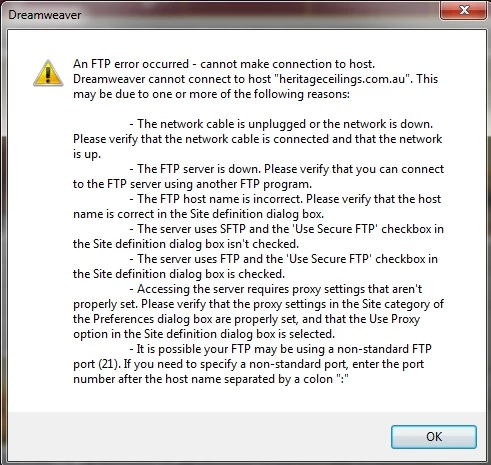
    I just went to make a minor change on my website and found I can't upload anything at all. I've got to get this issue sorted out first before I make any changes.

    I'm guessing something needs updating on the host's end?


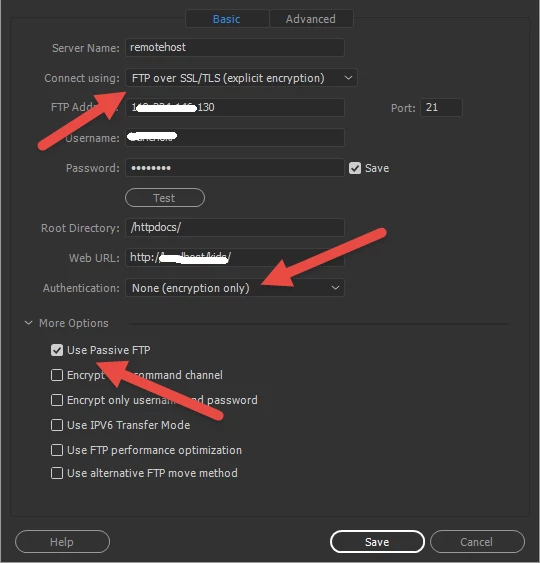
    Your server now requires SSL/TLS to function, this is assuming that the login details and the FTP Address is the same as before.

    Try the following settings

    2 replies

    Participating Frequently
    March 18, 2018

    Just rang my host to find out why I don't seem to have an option to connect as suggested. Guy I spoke to cannot understand why I'm on a Windows server when it would be better to be on a Linux server. He is going to swap over my other (non business) site first and if that works successfully then he will swap over the Heritage Ceilings website. He is talking about him inserting some script his end that will save me having to update my whole site. Hopefully this is a good idea because I don't have enough knowledge to know otherwise.  Even if he inserts some script his end I think I will still plod through my site and make the changes my end as well.

    Participating Frequently
    March 20, 2018

    Finally my website is secure.  I had a few issues with my host but they all got resolved. I've been through the whole website and found and replaced everything (or at least I think I've found everything).

    I want to thank everyone on this forum who has helped me so much. Particular thanks go to BenPleysier and osgood_.

    Thanks a million guys.

    Legend
    March 20, 2018

    jeanmorrison  wrote

    Finally my website is secure.  I had a few issues with my host but they all got resolved. I've been through the whole website and found and replaced everything (or at least I think I've found everything).

    I want to thank everyone on this forum who has helped me so much. Particular thanks go to BenPleysier and osgood_.

    Thanks a million guys.

    Great news, glad you got it sorted.

    BenPleysier
    Community Expert
    Community Expert
    March 16, 2018

    My host has two options to include a certificate, namely the free of charge 'Let's Encrypt' or purchased SSL/TLS Certificates.

    Choosing the former involves ticking a checkbox, the latter involves uploading your Certificate.

    After you have done that, you will need to ensure that the site is directed to HTTPS://. I have done that using .htaccess as per

    # ----------------------------------------------------------------------

    # Start rewrite engine

    # ----------------------------------------------------------------------

    # Turning on the rewrite engine is necessary for the following rules and features.

    # FollowSymLinks must be enabled for this to work.

    <IfModule mod_rewrite.c>

      Options +FollowSymlinks

      RewriteEngine On

    </IfModule>

    # ----------------------------------------------------------------------

    # Rewrite "www.example.com -> example.com"

    # ----------------------------------------------------------------------

    <IfModule mod_rewrite.c>

      RewriteCond %{HTTPS} !=on

      RewriteCond %{HTTP_HOST} ^www\.(.+)$ [NC]

      RewriteRule ^ http://%1%{REQUEST_URI} [R=301,L]

    </IfModule>

    The above code tells the browser, if HTTPS is not used in the address, to remove the 'www.' part of the address after which it automatically chooses HTTPS://

    Wappler is the DMXzone-made Dreamweaver replacement and includes the best of their powerful extensions, as well as much more!
    Participating Frequently
    March 16, 2018

    Thank you Ben.  I'm not sure I understand a lot of it so far but I will endeavour to figure it out over the weekend.

    Mine was a paid certificate organized by my site host. I checked with them, they have uploaded the certificate and they told me I have a Windows server. Does that make any difference to the ,htaccess file that I must write please?

    BenPleysier
    Community Expert
    Community Expert
    March 16, 2018

    In that case you cannot use .htaccess, for Windows you will need a file called web.config.

    Having said that, your Parallels Panel will probably negate having to use web.config. In the panel, go to IIS Settings

    and tick the Require SSL box

    As far as I can see and judging by the info that you have supplied, this is all you have to do.

    Wappler is the DMXzone-made Dreamweaver replacement and includes the best of their powerful extensions, as well as much more!