

Swandive stream
Inspiring
Apr 11, 2024 10:03 AM UTC
Answered

I keep losing connection to server

When I try to upload to my website server (FTP) I keep getting drop-outs like this:
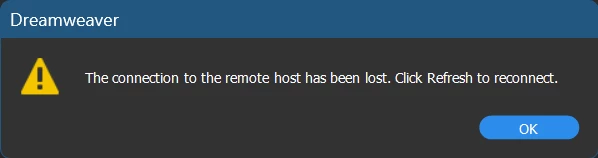
I was able to use FileZilla to access the server fine so I don't know what is causing the issues but it seems to be a Dreamweaver issue. I have given Dreamweaver access through the firewall (Windows Defender) to no effect. Temporarily disabling the firewall also didn't resolve it.

The website (very crude, I know) is https://uploading.fastertrack.com/

I'm using the latest version of Dreamweaver available (21.3)
This topic is closed to new replies. Start a new post to keep the conversation going.
Swandive stream
Swandive streamCorrect answer
Inspiring
Nov 25, 2024 12:51 AM UTC

Update: I seem to have figured out a solution although to be honest I'm not quite sure I 100% understand it.

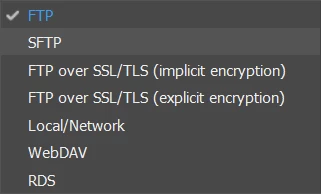
In the site setup window there are different options for "Connect using". I was using the FTP option and as a test try to different options for "Connect using".

When I switched to Connect using: SFTP I was able to connect to the server. That is secure ftp.

It's possible that the connexion was blocked from the hosting side for security reasons without me realising because I was trying to use standard FTP.


Tl:dr - Try using SFTP instead of FTP to connect.


Hopefully my problem is solved now 


11 replies

Swandive stream
Swandive streamAuthorCorrect answer
Inspiring
Nov 25, 2024 12:51 AM UTC

Update: I seem to have figured out a solution although to be honest I'm not quite sure I 100% understand it.

In the site setup window there are different options for "Connect using". I was using the FTP option and as a test try to different options for "Connect using".

When I switched to Connect using: SFTP I was able to connect to the server. That is secure ftp.

It's possible that the connexion was blocked from the hosting side for security reasons without me realising because I was trying to use standard FTP.


Tl:dr - Try using SFTP instead of FTP to connect.


Hopefully my problem is solved now 


Translate
Nancy OShea
Community Expert
Community Expert
Nov 25, 2024 2:31 AM UTC

When in doubt, ask your hosting provider which connection method they require you to use. 

It varies by server and type of hosting plan you have.


Translate
Nancy O'Shea— Product User & Community Expert
Swandive stream
Inspiring
Nov 25, 2024 3:08 PM UTC

I think I did contact them before

Translate
Nancy OShea
Community Expert
Community Expert
Apr 12, 2024 12:40 AM UTC

Time outs can happen when Dreamweaver is idle.  For security reasons, I disconnect from my server when I'm editing locally.  And then reconnect manually when I'm ready to transfer files to the server.


If your server is timing out during transfers, that could be a problem with your internet connection.


Translate
Nancy O'Shea— Product User & Community Expert
Swandive stream
Inspiring
Apr 21, 2024 11:57 PM UTC

I find it discconnects after ~5 minutes

Translate
Nancy OShea
Community Expert
Community Expert
Apr 22, 2024 12:42 AM UTC

So does mine if it's left idle.


Translate
Nancy O'Shea— Product User & Community Expert
Jon Fritz
Community Expert
Community Expert
Apr 11, 2024 12:29 PM UTC

Have you tried everything here:

https://helpx.adobe.com/dreamweaver/kb/troubleshoot-ftp-issues-dreamweaver-cs6-cc.html 

...especially toggling Use Passive FTP and FTP Performance Optimization (toward the bottom of the page)?

Translate