
Participant
June 25, 2020
Question

I'm unable to connect to server

  • June 25, 2020
  • 3 replies
  • 303 views

Hi everyone,


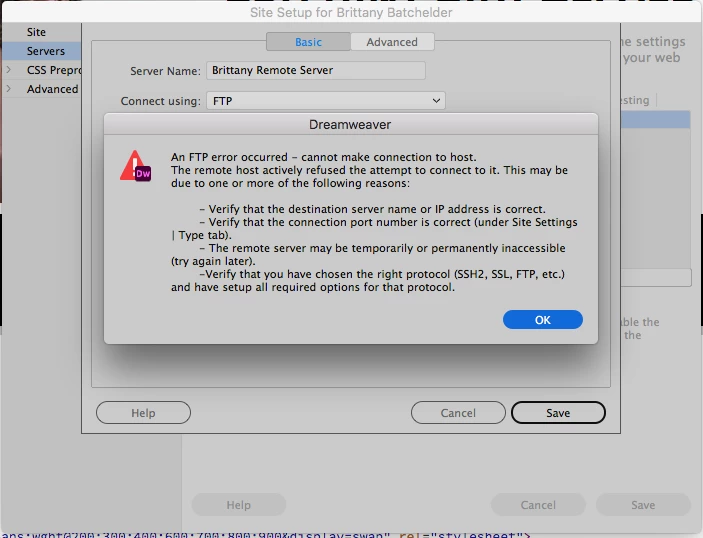
Before the latest update, I was able to connect to my client's server and upload my files just fine. Now, I'm having an issue connecting to my client's server. I'm receiving the notices in the screenshots below. I, nor my client changed anything in the server from the time I initially uploaded my files to the time updated the app and needed to make edits and upload again. Can anyone provide me with guidance on how to remedy this issue? Thanks so much!!! 😊😊😊
 

This topic has been closed for replies.

3 replies

Community Manager
June 25, 2020

Hi,


Thanks for reporting the issue.

Could you please check if your server is up or can you restart your server and then try connecting to it.

Also, can you please check if your local firewall settings might not block accessing the server.


Thanks

Dreamweaver Team

Nancy OShea
Community Expert
Community Expert
June 25, 2020

If Filezilla cannot connect, contact your hosting provider.

If Filezilla can connect, create a new site definition in DW and delete the old one.  See screenshot.


Nancy O'Shea— Product User & Community Expert
Jon Fritz
Community Expert
Community Expert
June 25, 2020

Have you tried another FTP application, like the free Filezilla Client, to verify you can connect to the server with your current FTP credentials?


Every now and again, server updates from the hosting company will kill your UN/PW. It actually happens pretty frequently with some of the bigger names out there.


Participant
June 25, 2020

I'm not familiar with Filezilla. I'll try it out and come back with the results!

Thank you so much for your advice!!