
Participant
December 7, 2016
Answered

I want to go back to DW 2015.2

  • December 7, 2016
  • 1 reply
  • 326 views

I "accidentally" upgraded Adobe CC to the 2017 version.  I am in a class on Web Design and Epublishing, and all of the lessons, tutorials, etc, are in 2015.2.  I am not handy with computer stuff.  I want to get rid of the 2017 version and go back to 2015 until I finish this class.  Is this possible
This topic has been closed for replies.
Correct answer Nancy OShea

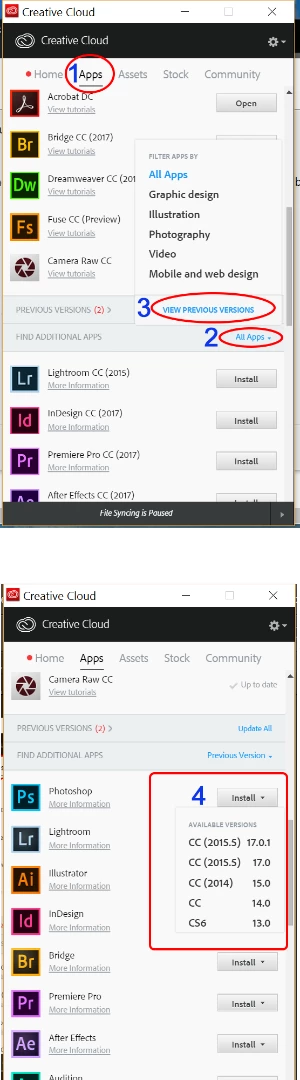
You can drop back to older versions from CC Desktop App. Click on APPS > FIND ADDITIONAL APPS > ALL APPS > PREVIOUS VERSIONS.

Nancy

1 reply

Nancy OShea
Community Expert
Nancy OSheaCommunity ExpertCorrect answer
Community Expert
December 8, 2016

You can drop back to older versions from CC Desktop App. Click on APPS > FIND ADDITIONAL APPS > ALL APPS > PREVIOUS VERSIONS.

Nancy

Nancy O'Shea— Product User & Community Expert
Participant
December 8, 2016

Thanks!