Participant
August 18, 2017
Answered

I want to old UI, help!

  • August 18, 2017
  • 4 replies
  • 453 views

Ok, it's been 5 or 6 years since I worked in DW on a day to day basis. The UI has changed to radically it's difficult for this aging veteran to find where they have hidden most the of core functionality. My html editing needs are fairly primitive.

It took me 15 minutes to find the properties element so I could format the html. Damn I feel old.

Does DW support a more classic UI based on the way the app used to look?

    This topic has been closed for replies.
    Correct answer BenPleysier

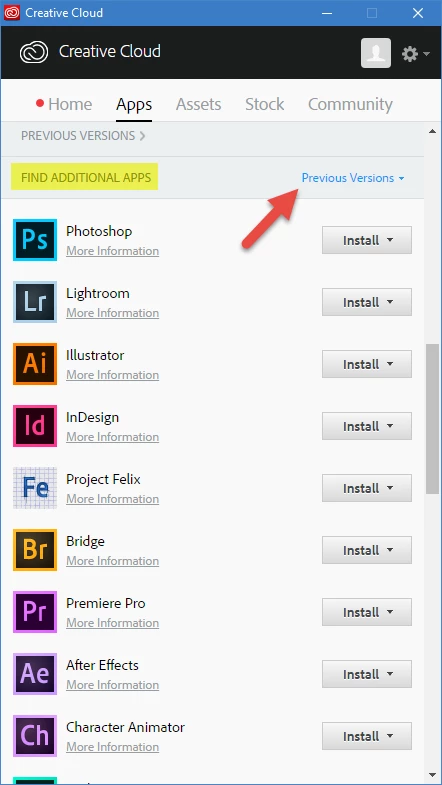
    Using the Creative Cloud App, you can download Dreamweaver CS6.

    4 replies

    Preran
    Community Manager
    Community Manager
    August 21, 2017

    Also look at this document that has the list of all changes New features summary for the 2017 releases of Dreamweaver CC

    If there are specific panels or options that you are looking for that you are having problems locating, let us know and we will do our best to help.

    Thanks,

    Preran

    Community Manager
    August 20, 2017

    You can always have your own workspace defined, which suits your own needs.

    Which version of DW are you using? You can change UI theme and code theme colors via Preferences > Interface in DW CC 2017.

    Please let us know if you need more information

    Nancy OShea
    Community Expert
    Community Expert
    August 19, 2017

    Previous versions are only available to paying Creative Cloud members.  Trial users won't see those options.

    On Windows, the keyboard shortcut for Properties panel is Ctrl+F3.

    Nancy O'Shea— Product User & Community Expert
    BenPleysier
    Community Expert
    BenPleysierCommunity ExpertCorrect answer
    Community Expert
    August 18, 2017

    Using the Creative Cloud App, you can download Dreamweaver CS6.

    Wappler is the DMXzone-made Dreamweaver replacement and includes the best of their powerful extensions, as well as much more!