


Participant
January 26, 2018
Answered

Image Dialog insert image url

  • January 26, 2018
  • 2 replies
  • 432 views

Ok so I have an issue where in the newer version of adobe I can't insert the image url with the image, this is for emailing purposes for an event and every time I tired to insert the web url  the image would disappear or will say file not found, so I went in to insert image and inputted the file web url then the file name and then it give me an air message saying that the file is not found. Now I am just editing a webpage for a friend and I have never had this happen to me before it there a way to insert the web url into the image?

This topic has been closed for replies.
Correct answer Nancy OShea

Do you use placeholder images? 

<img src="https://placeimg.com/400/300/nature" alt="...">

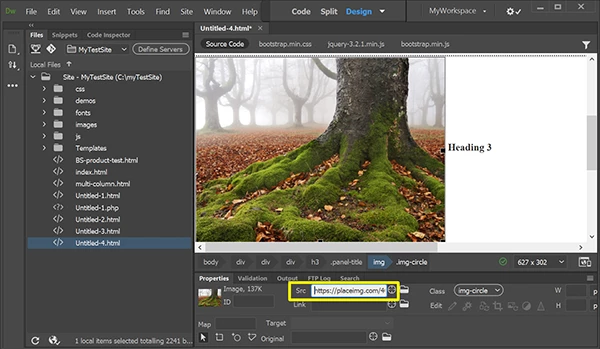
Then go to your Properties panel and paste your image URL into the SRC field.  See screenshot.

2 replies

Nancy OShea
Community Expert
Nancy OSheaCommunity ExpertCorrect answer
Community Expert
January 26, 2018

Do you use placeholder images? 

<img src="https://placeimg.com/400/300/nature" alt="...">

Then go to your Properties panel and paste your image URL into the SRC field.  See screenshot.

Nancy O'Shea— Product User & Community Expert
Jon Fritz
Community Expert
Community Expert
January 26, 2018

What, exactly, are you entering for the URL?

If you're missing any part of the complete url, say the protocol bit before the www, DW will say "file not found" because the path is incomplete.

DW also has some issues with externally linked files showing in Design and Code Views and may show a broken image icon or "file not found" while hovering the image link in Code View, even though the image is linked correctly.

What does it look like in Live View or when previewed in browsers?