milanv88816259
Participant
August 5, 2019
Answered

Image Map Creation

  • August 5, 2019
  • 3 replies
  • 1094 views

I'm working on a Dreamweaver tutorial which was supposed to deliver a mapped image ready for coding clickable links over various sections of the image.

Long story short: The prefab image wasn't there, so I decided to try to grab an image from Wikimedia Commons and set it up for mapping myself.

However, I couldn't find the mapping tools in Dreamweaver 2019, and all the tutorials and forum discussions of this topic were old and provided no answers in spite of my clicking on various buttons, menus and whatever, including CSS Designer, where there were no mapping functions

I'm attaching a screenshot of what I have up at the moment. The idea is to insert a clickable area over each of the faces. If anyone can tell me how to open up the mapping tools I would be very grateful!

This topic has been closed for replies.
Correct answer BenPleysier

3 replies

milanv88816259
Participant
August 5, 2019

Thanks a lot Ben and Nancy! You solved my problem and saved me a bunch of time!!! I'll follow your advice, Nancy.

Nancy OShea
Community Expert
Community Expert
August 5, 2019

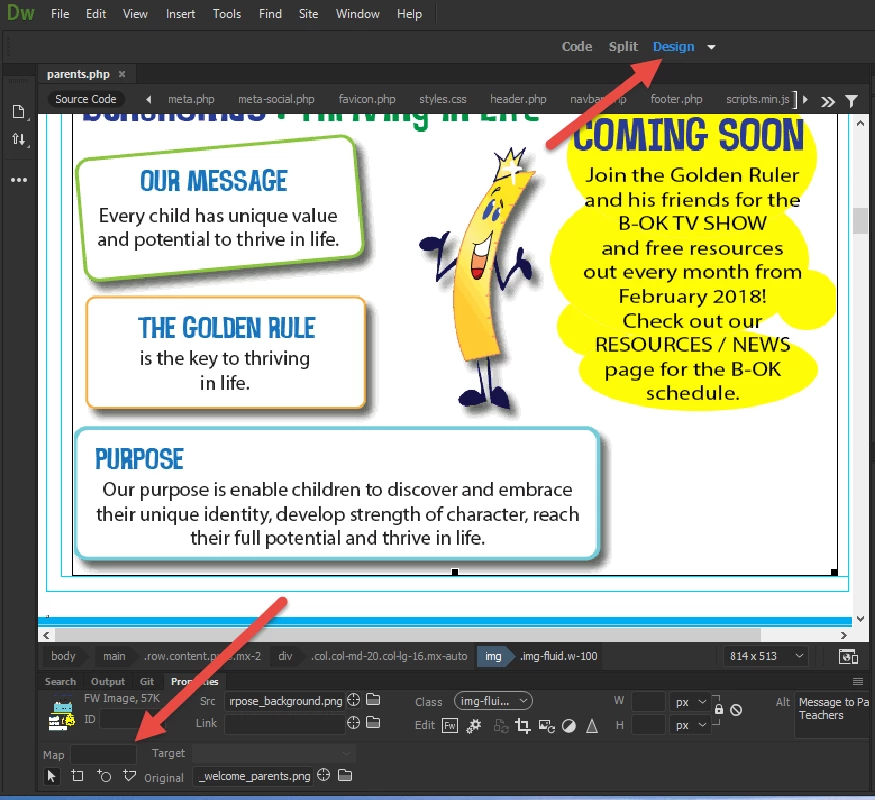
Switch to Design View (Document Toolbar)  See screenshot..

That said, if you're building your site responsively to fit all devices (as well you should),  old fashioned image maps won't work well.  Hotspot coordinates invariably drift out of register when the image is re-scaled. 

OPTION 1

Dont' use classic image maps.  Use individual linked images instead.

OPTION 2

Use SVG code to build a responsive image map.   See code & working example below.

https://jsfiddle.net/NancyO/6k3v4ge1/13/

Nancy O'Shea— Product User & Community Expert
milanv88816259
Participant
August 5, 2019

Thank you!

BenPleysier
Community Expert
BenPleysierCommunity ExpertCorrect answer
Community Expert
August 5, 2019

Wappler is the DMXzone-made Dreamweaver replacement and includes the best of their powerful extensions, as well as much more!
milanv88816259
Participant
August 5, 2019

Thank you! You answered my question!!!