Known Participant
February 25, 2017
Answered

Images not showing (CC 2017)

  • February 25, 2017
  • 3 replies
  • 3751 views

I know html quite well, and css reasonably well. I built my website more than 20 years ago, and always loved Dreamweaver. But since a half year or so images will not show when I upload the page. It started with pages which I uploaded before uploading the image, but it still worked fine when I first uploaded the image and only afterwards the page.

Now the images don't show at all. There is no difference if I upload the pictures first or after the page. Online I only see the little squares. After a few days they appear, but I need them right away. When I want to show a customer the paintings he/she asked for, I have to show them immediately.

Is it Dreamweaver which doesn't work right, or is it a glitch of browsers? It is identical in all browsers, so it is not just one browser. That looks to me as if Dreamweaver causes it.

Anyone knows of this problem?

Lotti

    This topic has been closed for replies.
    Correct answer hans-g.

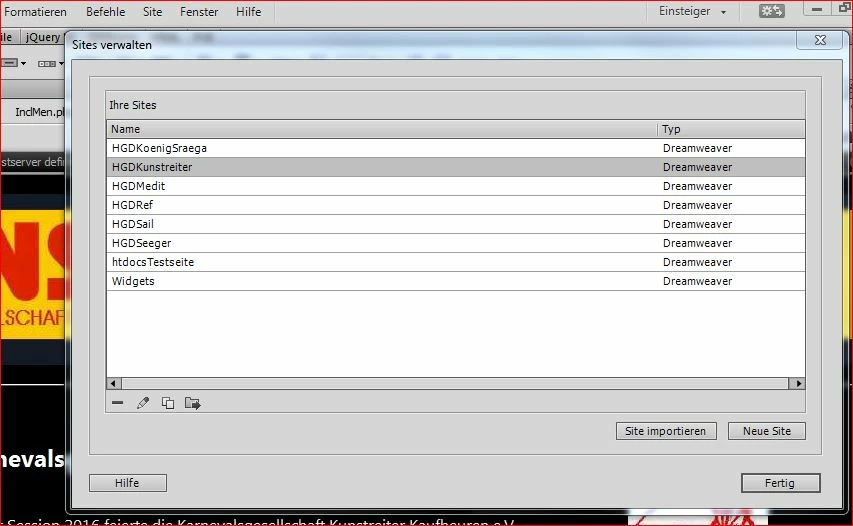
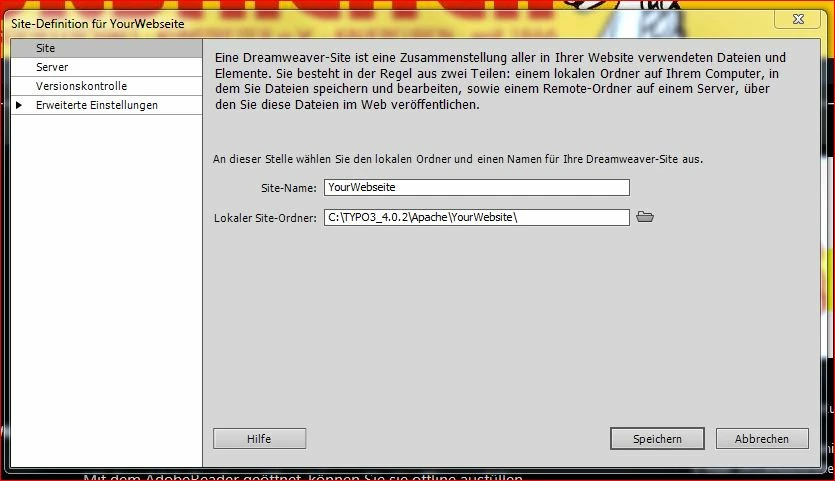
    .... first an addition to Jon's help about "Site Definition" (see screenshot of my German DW):

    I hope you remember and can find the menu. (German: Site >>> Ihre Sites >>> Neue Seite >>>

    Hans-Günter

    3 replies

    Jon Fritz
    Community Expert
    Community Expert
    February 27, 2017

    Because I don't see mention of it above, and it's the most common reason DW would place absolute paths to your HD, are you working from a Defined Site in the new version of DW or are you simply modifying old files with the new program?

    Could you post a screen capture of your Files window from DW (F8 or Windoe > Files if it's not open).

    Known Participant
    February 27, 2017

    Yes, I am modifying old files. I still am ages removed from making a new page in 2017, for the time being I can only start with existing pages and modify them for new use.

    My website consists of several thousands of pages - so I will be working in existing pages most of the time anyway.

    I think it must have happened when I moved the website around. I used an old one for learning CC2017, but then mixed things up. I have backups, but then I lose my latest work. Maybe the best thing is, to remove the website from Dreamweaver, and then introduce it again as a new website. Going to make a recent backup before I start experimenting.

    I couldn't find anything in Dreamweaver like your "Einsteiger", but remembered it is called property inspector, so I googled that. It sits in windows/properties, but that only shows a darkened bar, all options are greyed out.

    Going to try removing the site from Dreamweaver and put it back again before I search for solutions for other problems.

    Jon Fritz
    Community Expert
    Community Expert
    February 27, 2017

    It appears you're getting one of Hans' replies mixed with mine.

    If you haven't created an actual Site Definition, and selected it from the drop down menu in the Files window, in DW and are just browsing to pages on your HD to make changes, you will always get the absolute files// addresses when you make links/insert images.

    hans-g.
    Legend
    February 25, 2017

    Hi Lotti,

    as an addition: Would you please send a link to your website in question. Maybe we can so find a hint for you.

    Hans-Günter

    Known Participant
    February 25, 2017

    An hour after I came here, I talked about it with a friend and she asked how the link looked. It pointed to the image - but with the entire folder path. Of course a website cannot open an image somewhere in my PC. But the problem is still there: when I enter an image in a page, Dreamweaver puts in the folder path instead of the image relative to the page.

    This is an example of how it looks online. I can now change the links, so it is no disaster anymore.

    But I don't want Dreamweaver to do this. Changing every link is clumsy. I guess it has something to do with the site manager, but there everything seems fine.

    Ben and Hans, thanks for your answers.

    If someone knows what happens, I'd be very obliged.

    Lotti

    Known Participant
    February 25, 2017

    Forgot the link: Anton Heyboer

    Lotti

    BenPleysier
    Community Expert
    Community Expert
    February 25, 2017

    It is not caused by Dreamweaver. Dreamweaver is a tool that you use to build a website. How you use it and how you code is up to you. Once the website has been uploaded, Dreamweaver has no influence.

    Wappler is the DMXzone-made Dreamweaver replacement and includes the best of their powerful extensions, as well as much more!