jillk34314525
Participant
September 11, 2017
Answered

Images not showing in design view in CS6

  • September 11, 2017
  • 1 reply
  • 5554 views

Everything was working fine up until Sep 1, 2017 when my images in design view are not showing up. It shows the generic "broken link" image even though the images are linked properly. I can see the images in live view and when viewing in browser, just not in design view. Does anyone have a fix for this? I was told by Adobe customer service on the phone that they no longer service CS6. Here's the code:

<!DOCTYPE html PUBLIC "-//W3C//DTD XHTML 1.0 Transitional//EN" "http://www.w3.org/TR/xhtml1/DTD/xhtml1-transitional.dtd">

<html xmlns="http://www.w3.org/1999/xhtml">

<head>

<meta http-equiv="Content-Type" content="text/html; charset=utf-8" />

<title>Untitled Document</title>

</head>

<body>

<img src="https://www.njpacoop.org/files/7615/0515/7051/Fall-Classes.png" />

</body>

</html>

This topic has been closed for replies.
Correct answer Nancy OShea

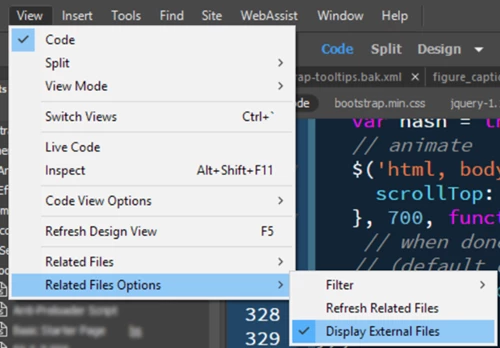
Go o View > Related Files > Display External Files.

1 reply

Nancy OShea
Community Expert
Nancy OSheaCommunity ExpertCorrect answer
Community Expert
September 11, 2017

Go o View > Related Files > Display External Files.

Nancy O'Shea— Product User & Community Expert
Inspiring
November 30, 2018

That option shows in a different spot in the menu for me (maybe because I'm using Windows?).

Regardless, it doesn't work. My images are still showing up as gray boxes. I could live with this if the size of the images was correct.

Any ideas?

ALsp
Legend
November 30, 2018
Regardless, it doesn't work. My images are still showing up as gray boxes. I could live with this if the size of the images was correct.

If so, I wonder why this question is marked as answered. Hmm.

Anyway, try restarting Dreamweaver. Windows and Dreamweaver are sometimes a little funky with external images. I know this because that how we code our email newsletters and I've found that CC is a lot more problematic than CS6 in this area (another reason I use CS6). I also find that if use the SRC box on the property inspector to paste in the URL to an image, it seems to wake Dreamweaver up.

The bottom line is that it should work for you. I'm sorry if it doesn't.