Participant
September 10, 2023
Answered

Importing an existing website into a new Adobe DW account.

  • September 10, 2023
  • 4 replies
  • 593 views

Hi All, I recently changed institutions and need to reset up my website via a new Adobe Dreamweaver account on a new computer. I don't have any .ste files that I can tell, but all my website content is in one folder in Google Drive. How do I import my website into Dreamwever on this new computer/account? Thanks!

    This topic has been closed for replies.
    Correct answer Nancy OShea

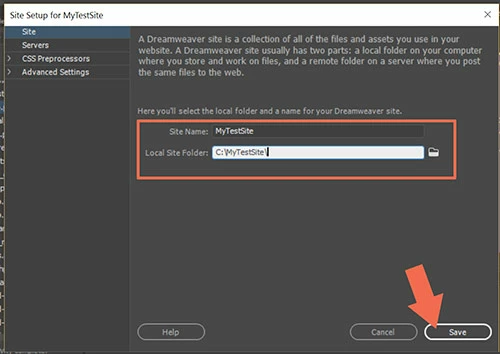
    Go to Site > New Site... click the folder icon to browse for a Local Site Folder on your primary hard drive. For example, C:\MyTestSite\


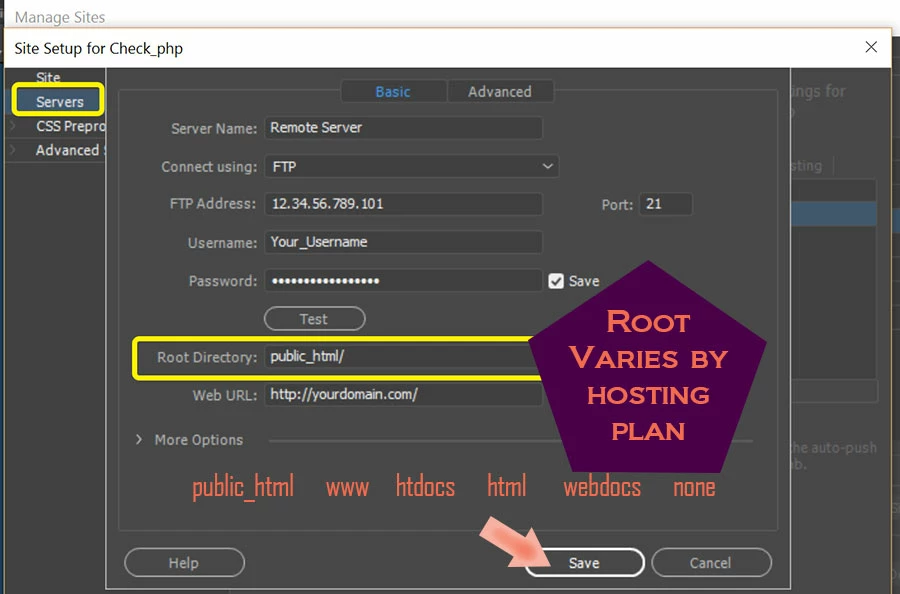
    Click on Servers tab and enter your remote server's log-in credentials and Root Directory.  If you're unsure what those are, ask your hosting provider.


    That's it in a nutshell. 

    Be sure to export your site definition settings to STE file and store it in a safe place.


    4 replies

    Community Expert
    September 11, 2023

    That's exactly what I was saying in my first comment, except that if a change has been made online, there will be a difference with the archive placed on the google drive. That's why I recommended backing up the data already online before synchronization.

    Nancy OShea
    Community Expert
    Community Expert
    September 10, 2023
    quoteall my website content is in one folder in Google Drive.
    By @Elizabeth32185771sya5

    ============

    Copy site folder from Google Drive to your local primary hard drive.  


    Nancy O'Shea— Product User & Community Expert
    Nancy OShea
    Community Expert
    Nancy OSheaCommunity ExpertCorrect answer
    Community Expert
    September 10, 2023

    Go to Site > New Site... click the folder icon to browse for a Local Site Folder on your primary hard drive. For example, C:\MyTestSite\


    Click on Servers tab and enter your remote server's log-in credentials and Root Directory.  If you're unsure what those are, ask your hosting provider.


    That's it in a nutshell. 

    Be sure to export your site definition settings to STE file and store it in a safe place.


    Nancy O'Shea— Product User & Community Expert
    Participant
    September 18, 2023

    This worked - thank you!!! 

    Community Expert
    September 10, 2023

    In any case, without .ste, and on a new machine, you'll need to create a brand new site.


    Then you have two options:

    • either connect to the online site and upload it to your new site's local folder
    • or retrieve the files from your Google Drive and install them locally.

    If you opt for the latter solution, I'd advise you to make a backup of the online version first, before launching any synchronization.

    Participant
    September 18, 2023

    I didn't have to retrieve my files from Google Drive and install them locally - I was able to link to my sites "local folder" via Google Drive. Thanks!

    Nancy OShea
    Community Expert
    Community Expert
    September 18, 2023
    quote

    I didn't have to retrieve my files from Google Drive and install them locally - I was able to link to my sites "local folder" via Google Drive. Thanks!

    By @Elizabeth32185771sya5

    ===========

    Make a note of this for future reference.

    You could have lagging & file read/write problems with this set-up later.

    Dreamweaver can't communicate with files on cloud drives as fast as it does with your local hard drive.

    If you begin to experience file errors, you know why.


    Nancy O'Shea— Product User & Community Expert