Participant
July 7, 2017
Answered

Importing my existing website into dreamweaver

  • July 7, 2017
  • 1 reply
  • 2705 views

My issue is i started importing my existing site onto my local computer and dreamweaver quit "unexpectedly". When I start importing again will dreamweaver re-import or take up where it left off?

    This topic has been closed for replies.
    Correct answer Nancy OShea

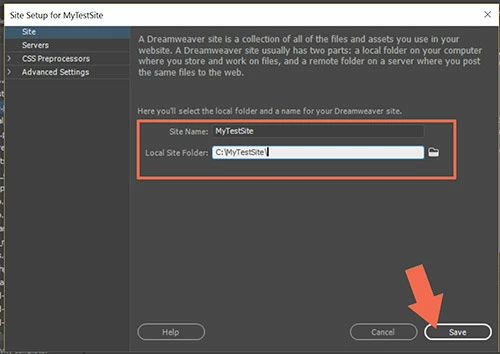
    If the site files are already on your hard drive, just define a new site in DW by going to Site > New Site & pointing to the site folder on your primary hard drive.   Example : C:\MyTestSite\

    See screenshots below.
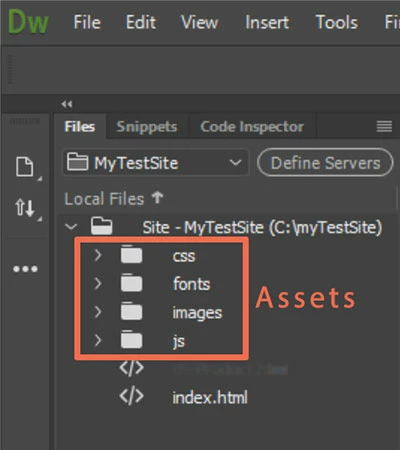
    Your files Panel will show the site files and folders.
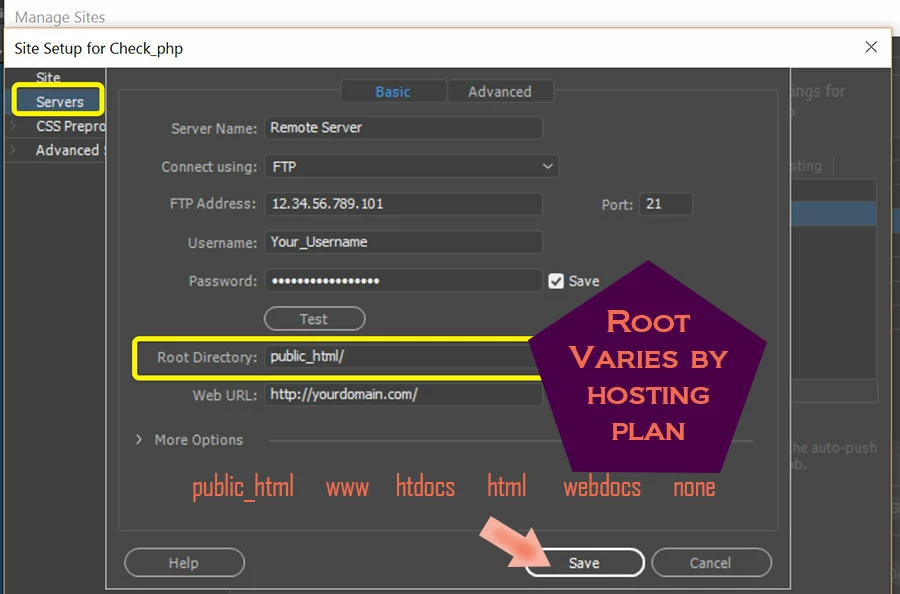
    If your site is not on your local hard drive yet, you'll need to GET files from your server.  That requires entering your FTP log-in credentials in the Manage Sites panel, Servers tab.  If unsure what to enter here, check with your hosting provider.
    1 reply

    Nancy OShea
    Community Expert
    Community Expert
    July 7, 2017

    Please explain more about what you mean by "importing."

    • Which version of DW?
    • Which operating system?
    • Are you attempting to GET files from the remote server to your locally defined site folder?
    • Or are you importing site definition STE files through the Manage Sites panel?
    • Any error messages or codes pop-up?
    • If DW is crashing, what do your crash logs / Windows Event Viewer say is causing the problem?

    Nancy

    Nancy O'Shea— Product User & Community Expert
    Participant
    July 7, 2017

    Will look into the above when home thanks.

    Doug

    Sent from my iPhone



