mchumor
Participating Frequently
February 17, 2023
Answered

In Dreamweaver how do I delete Links to Different Pages on one Website

  • February 17, 2023
  • 2 replies
  • 1261 views
How do I delete multiple hyperlinks in Dreamweaver to different pages on a website? I’ve seen ways to delete all hyperlinks on a page or manually delete some hyperlinks, but not a way to quickly delete multiple pages to multiple pages on a website.
 
Here’s my situation. I license 4,000-plus of my cartoons via a 1,000-plus-page Dreamweaver site (mchumor.com) and a 4,000-plus-page Managed WordPress/Woocommerce site (thekomic.com). 
 
Each cartoon on the Dreamweaver site links to a DIFFERENT page on Wordpress site, a page that lets people download the cartoons directly. 
 
As an example, if you go to https://mchumor.com/stonehenge-cartoons-pg1.html and click on the first cartoon, changing to Daylight Saving Time, it takes you to https://thekomic.com/cartoon/9060-daylight-saving-time-cartoon/
 
If you click on the second cartoon on the page about Easter Island underwater, it takes you to https://thekomic.com/cartoon/8843-ocean-cartoon/
 
Alas, the Wordpress site has so many issues and costs so much annually, that I’ve decided to get rid of it and email people cartoons.
 
Before I ditch the site, though, I need to remove all links to the numerous pages on https://thekomic.com/ 
 
Thanks for any advice.
This topic has been closed for replies.
Correct answer L e n a
quote
Before I ditch the site, though, I need to remove all links to the numerous pages on https://thekomic.com/ 
By @mchumor


@mchumor , Sorry, I just saw this thread now and I remark that you had already given a good answer, so I don't know if you are still looking for a solution that would allow you to remove all the links from the first site in DW that point to the second site in Wordpress.


If you are interested, you should try to use regular expressions.

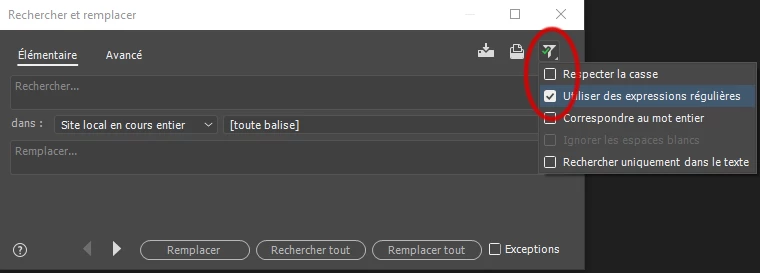
To do this, Ctrl shift F, to access the search in files, then do not forget from the small funnel of filters to check Use regular expressions.

Then in the Basic tab, place the following REGEX string as the search item


((?i)<a href="https:\/\/thekomic.*?>)(.*?)(<\/a>)


The (?i) part is not necessary, but I saw that in your code, some time you're using href and some time HREF.


And in the replacement field, stuffs will depend on what you want to preserve...

  • the emerged part of the link ?
  • or nothing at all ?, and so delete everything anchor tag and visible part of the link...

Well, if you want to delete everything, leave the replacement field empty
otherwise to keep the emerged part of the link place


$2


The IN field should reflect the entire site.

I haven't test it, but that should do the job !

Anyway, think of doing a test on some pages first ... and don't forget of making a copy of your site beforehand.


2 replies

L e n aCommunity ExpertCorrect answer
Community Expert
February 21, 2023
quote
Before I ditch the site, though, I need to remove all links to the numerous pages on https://thekomic.com/ 
By @mchumor


@mchumor , Sorry, I just saw this thread now and I remark that you had already given a good answer, so I don't know if you are still looking for a solution that would allow you to remove all the links from the first site in DW that point to the second site in Wordpress.


If you are interested, you should try to use regular expressions.

To do this, Ctrl shift F, to access the search in files, then do not forget from the small funnel of filters to check Use regular expressions.

Then in the Basic tab, place the following REGEX string as the search item


((?i)<a href="https:\/\/thekomic.*?>)(.*?)(<\/a>)


The (?i) part is not necessary, but I saw that in your code, some time you're using href and some time HREF.


And in the replacement field, stuffs will depend on what you want to preserve...

  • the emerged part of the link ?
  • or nothing at all ?, and so delete everything anchor tag and visible part of the link...

Well, if you want to delete everything, leave the replacement field empty
otherwise to keep the emerged part of the link place


$2


The IN field should reflect the entire site.

I haven't test it, but that should do the job !

Anyway, think of doing a test on some pages first ... and don't forget of making a copy of your site beforehand.


Nancy OShea
Community Expert
Community Expert
February 17, 2023

Eeek! This workflow boggles the mind.  Why would you choose a static site over a database driven one?  I would do the complete opposite and ditch the static site, keep using WordPress as the main website.


PROS:  WordPress is database driven. No static pages to maintain.  Content is stored in a MySQL database and pages are generated by your server. People can search for content and easily find exactly what they want instead or scouring through an endless array of lists and links to more static pages.   WordPress supports WooCommerce (e-commerce) plugin which would facilitate accepting online payments and as soon as customer pays, they're automatically sent to their digital download.  No human intervention needed. 


These days, customers want instant gratification when they pay for digital content.  If they don't get it at one place, they typically go to another.


In answer to your original question, you'll need to do a LOT of Find & Replace (Ctrl+Shift+F).  If your site was database driven, it would be much faster & simpler to do with SQL statements.  But since it's not, you're managing Magilla Gorilla.


Nancy O'Shea— Product User & Community Expert
mchumor
mchumorAuthor
Participating Frequently
February 18, 2023
I know it seems absurd that I would go with the Dreamweaver site over the Wordpress site. About ten years ago I paid a web developer in Portland OR almost $9,000 to develop the Wordpress site. I promptly I went from having 10,000 daily page views on my Dreamweaver Site to, on a good day, 100 viws. My Dreamweaver site these days still has more hits than the Wordpress site.
 
The biggest problem, though, is The Wordpress site has many glitches, including going down on a regular basis. GoDaddy manages it and every time I call about a problem they either sell me something, something that doesn’t seem to help or charge me to fix things, fixes that break shortly thereafter. Last year I paid GoDaddy over $1,000 for a site that was literally down half the time. So, absurd as it may seem, I’m ditching it.
 
If I have to manually delete all the links, so be it, but I’m hoping someone has a suggestion to avoid that Herculean task.
BenPleysier
Community Expert
Community Expert
February 18, 2023

If I were in your situation and with the knowledge that I currently possess, I would not go to the trouble of changing parts of the current site, but create a new site. I say this because the site is showing its age. I would also not use Dreamweaver as my tool of choice, it is lacking modern features and is approaching end of life.


Using a low code tool would allow you to build a new modern site in record time which would have many advantages over WordPress.


My choice of tool would be Wappler. You could pay for Wappler on a monthly contract, so that when you have finished creating the project, you could stop paying for Wappler. Minor modifications to the website can be made using a free tool like VSCode. Major changes could be made by paying for Wappler for another month.


My choice of host would be Railway because of its cost benefit and ease of deployment. See https://youtu.be/kaQqH9GIYh8.


To save money, you could use SQLite as the database. SQLite does not need a server and is good enough for your application.


I say this to give you another option, not to force my ideas onto you. Others will have their views.


PS: Yes this is a lot of work just to get all of the images uploaded and registered in a database. If the project is correctly setup, you can upload many images at once and automatically registered in the database.


Wappler is the DMXzone-made Dreamweaver replacement and includes the best of their powerful extensions, as well as much more!