
Participating Frequently
October 7, 2018
Question

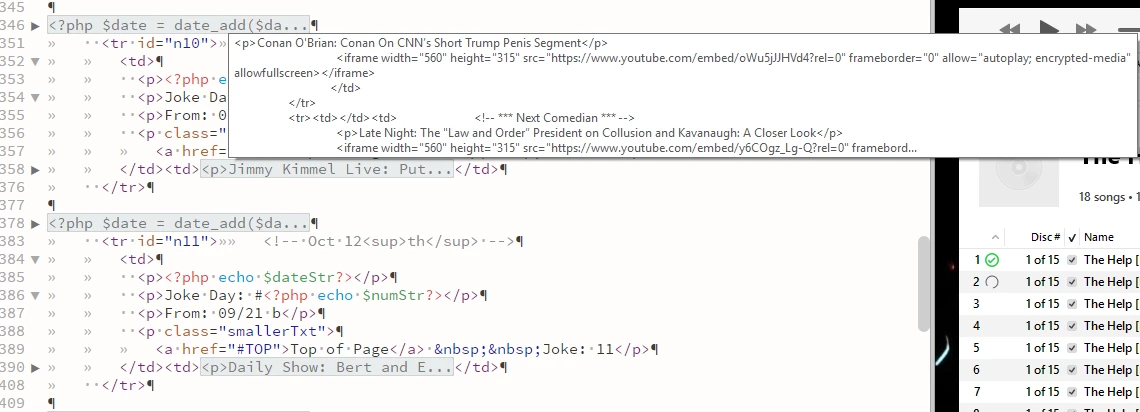
In edit in DW popup appears
  • October 7, 2018
  • 1 reply
  • 378 views

Notice the popup piece of code.  It appears above all DW windows and Firefox tabs such as the one I'm in right now.  Nothing under it can be reached without moving the page up and down.  Several tabs are open in DW, but this piece of code isn't selected on any of them.  The popup appears on every tab, however.

This has been happening for several months and is quite annoying.  To remove it I have to go to each tab and highlight anything then un-highlight it.  Or close DW and reopen it.  Neither 'solution' is very good.

Solutions?

    This topic has been closed for replies.

    1 reply

    Nancy OShea
    Community Expert
    Community Expert
    October 7, 2018

    It looks like collapsed code, lines 346 - 350.   When you mouse over collapsed code in DW, you should see a pop-up.  That is the expected behavior.   The solution is to click the left triangle to un-collapse code.

    Nancy O'Shea— Product User & Community Expert
    Participating Frequently
    October 8, 2018

    Starting with line 346 to 50 is some PHP code.  The displayed code isn't from the tab that happens to be open under it.  In fact, the displayed box is modal and will appear over a browser that appears over the DW window below it.

    (Sorry for the late reply.  It seems I was logged out and unable to reply and didn't realize that was the case of that.)