
broomeGirl
Inspiring
July 16, 2022
Answered

indent property

  • July 16, 2022
  • 4 replies
  • 885 views

Hi just wondering whether its possible to indent a line in a text box that is not a first line.


Trying to get the website email line to be in line with the rest of the text but it is slipping below the image as it should.


Thanks a million 🙂

    This topic has been closed for replies.
    Correct answer Nancy OShea

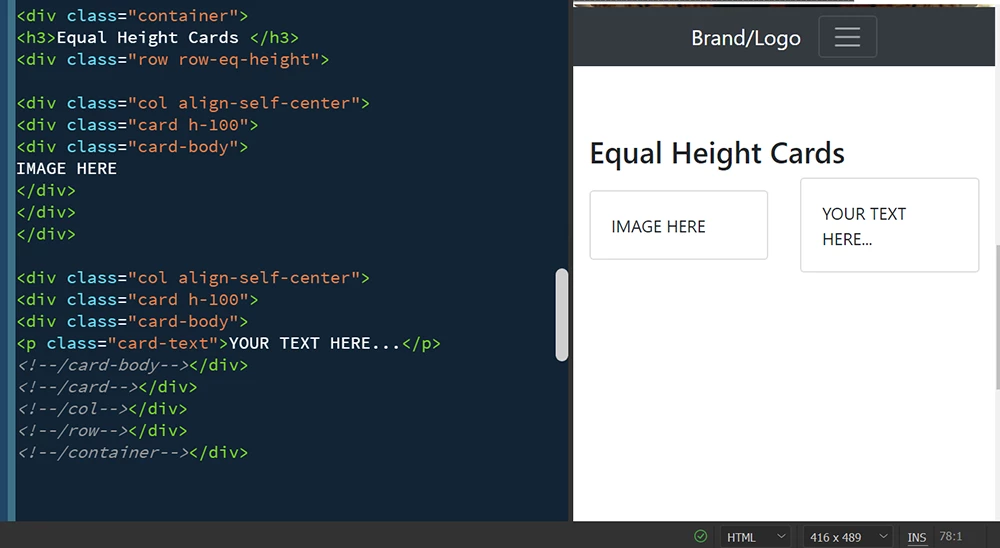
    Or if you use Bootstrap, insert 2 Bootstrap Cards like so.


    4 replies

    broomeGirl
    Inspiring
    July 17, 2022

    Thanks so much everyone .. will take on your advice for the 2 columns

    Nancy OShea
    Community Expert
    Community Expert
    July 16, 2022

    Short answer:  Use 2 columns.  Put image in column 1, put text in column 2.


    Working example with CSS Grids:


    <!doctype html>
    <html lang="en">
    <head>
    <meta charset="utf-8">
    <title>CSS Grid</title>
    <meta name="viewport" content="width=device-width, initial-scale=1"><meta http-equiv="X-UA-Compatible" content="IE=edge">
    <style>
    .grid_container {
    display: grid;
    grid-template-columns: repeat(auto-fill, minmax(210px, 1fr));
    grid-auto-rows: 
    grid-gap: 1em;
    border: 1px dotted silver;
    }
    .grid_container div {
    vertical-align: middle;
    width: 100%;
    height: auto;
    }
    </style>
    </head>
    <body>
    <div class="grid_container">
    <div>
    <img src="https://dummyimage.com/200x200" alt="Placeholder">
    </div>
    <div>
    <p>Lorem ipsum dolor sit amet, consectetur adipisicing elit. Culpa similique adipisci ad odio voluptas quod, laborum eligendi harum aliquid repudiandae! Aspernatur, possimus tenetur porro modi in rerum quaerat quod labore!</p>
    </div>
    </div>
    </body>
    </html>


    Nancy O'Shea— Product User & Community Expert
    Nancy OShea
    Community Expert
    Nancy OSheaCommunity ExpertCorrect answer
    Community Expert
    July 16, 2022

    Or if you use Bootstrap, insert 2 Bootstrap Cards like so.


    Nancy O'Shea— Product User & Community Expert
    Legend
    July 16, 2022

    Simplest way would be to use 2 columns. Insert your image in the 1st column and your text in the 2nd column. That way the text cant move under the image or if your text is wrapped in a <p> tag or <div> tag then add some left-margin to it, so the text is pushed clear of the image.


    As Birnou says, for more advice we would need to see the html you are using. Can you post it in the forum?

    B i r n o u
    Legend
    July 16, 2022

    there is a big piece of information missing... what is your HTML structure... it's based on that, that the CSS will be able to correctly define the property to set.
    but at first sight, text-indent would not be the property to target... rather margin or padding... and if your A TAG is inside the text block... nothing should be applied

    broomeGirl
    Inspiring
    July 16, 2022

    Thanks so much for getting back to me 🙂


    This is the html


    <a href="http://www.broomecamelsafaris.com.au" target="_blank" rel="noopener noreferrer">Website</a> &nbsp;&nbsp;&nbsp;&nbsp;&nbsp;&nbsp; <a href="mailto:bookings@broomecamelsafaris.com.au">Email</a>&nbsp;&nbsp;&nbsp;&nbsp;&nbsp;&nbsp; <a href="tel:80419 916 101">Tel: (08) 0419 916 101</a>


    and I tried


    <a class="IndentForTours" href="http://www.broomecamelsafaris.com.au" target="_blank" rel="noopener noreferrer">Website</a> &nbsp;&nbsp;&nbsp;&nbsp;&nbsp;&nbsp; <a href="mailto:bookings@broomecamelsafaris.com.au">Email</a>&nbsp;&nbsp;&nbsp;&nbsp;&nbsp;&nbsp; <a href="tel:80419 916 101">Tel: (08) 0419 916 101</a>


    CSS

    .IndentForTours {margin-right: 168px;}


    This is what I got 😞
