


Participant
Apr 9, 2021 6:07 PM UTC
Question

Inserting mp4 video

Hello

I am new to DW 2021 CC and have encountered a problem inserting .mp4 video links into DW. After I click HTML5 Video,  in the Properties panel I choose an .mp4 video in a local folder and then get the following alert: 
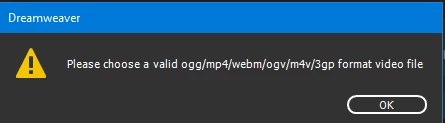


I don't see how one can choose an .mp4 file in addition to initially choosing it. Thanks for any suggestions.

Monty

    This topic is closed to new replies. Start a new post to keep the conversation going.

    5 replies

    Community Expert
    Apr 9, 2021 8:46 PM UTC

    Is the video within your site?  If not it should be located within your site as if it is outside, DW will not be able to link to it.  Also how was the mp4 video encoded?  I'm wondering if it could also be the encoding.

    Translate
    Participant
    Apr 10, 2021 12:51 AM UTC

    The file to which I cannot linked was created by a GoPro Hero 9. Thanks for the question about encoding. I haven't confirmed my theory yet, but a little research suggests that the file that will not allow linking is a 4K file and has been encoded in H.265 (HEVC) and DW doesn't support it yet. Since my post I selected a file downloaded from YouTube and it plays perfectly in the Live view.

    Translate
    Nancy OShea
    Community Expert
    Community Expert
    Apr 10, 2021 11:27 PM UTC

    See if this helps:

    Transcoding with Adobe Media Encoder

    https://vimeo.com/257166526


    Translate
    Nancy O'Shea— Product User & Community Expert
    Nancy OShea
    Community Expert
    Community Expert
    Apr 9, 2021 8:44 PM UTC

    1. No need for webm and ogg alternative sources anymore.  MP4 is supported by all browsers now.

    2. I can't repeat that message on my end.  Can you hit OK and escape out of it?


    This is the only code you need for player, poster image and video.

    <!doctype html>
    <html lang="en">
    <head>
    <meta charset="utf-8">
    <title>MP4 test</title>
    <meta name="viewport" content="width=device-width, initial-scale=1">
    </head>
    
    <body>
    <video poster="folder/my_poster.jpg" controls="controls" >
    <source src="folder/my_video.mp4" type="video/mp4">
    </video>
    </body>
    </html>


    Translate
    Nancy O'Shea— Product User & Community Expert