


pliles
Inspiring
January 23, 2017
Answered

Inserting Multiple Images Into HTML File CC2017

  • January 23, 2017
  • 5 replies
  • 2042 views

Why can't I select multiple images in the FILES PANE and drag them onto my HTML page?  It worked a long time ago on earlier versions of DW but recently does not?  If I select three, it brings in only one.

Second part, I now select several images using FINDER on my Mac and was able to drag them into the HTML page.  In DW 2017, I get a message saying "Your files are not within the root" even through they really are?  When I drag them into the HTML file, I have to bring them in one at a time and then delete the local path name? 

Below, the file I want to bring in is in the path  /starlighters/2017-01-21/    that is the images is at  /starlighters/2017-01-21/2017-01-21-starlighters-post-diner-001.jpg

If I say YES, it moves ONE AT A TIME.....  If I say no I get a pathname of //LILES/MAC-HD/users/sites/starlighters/  in every image and have to remove and replace them...... 
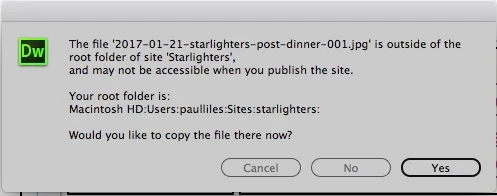
Until I can do this, I go back to CS5 and bring in the images?

    Correct answer pziecina

    The feature you are referring to is a known bug in Dw 2017, and is being worked on.

    Also you can no longer select files outside of Dw's root folder for the site for inclusion. Doing so will give you the error you mention, this is also being look into.

    5 replies

    Participant
    September 30, 2019

    Has this been fixed?

    Jon Fritz
    Community Expert
    Community Expert
    September 30, 2019
    In CC2019, dragging multiple files from the Files window brings only one of the files into the page (the one you click when dragging multiples). You can drag from the desktop and it will ask you if you want to make a copy of the file in your site, this includes multiple files... So, it sort-of works the way it used to, almost.
    Participant
    April 19, 2025

    IT WORKS ! THANKS : )

    pliles
    plilesAuthor
    Inspiring
    June 19, 2017

    GREAT!  I can not use the ASSET frame and insert multiple images but they are put into the HTML page in REVERSE ORDER....  I gove up... Had to insert 93 images by hand for cut/past/manually sort the images.  Using finder I get the not in root... I put the images in the root and still does not work!  VERY VERY frustrating and I deleted Dreamweaver CS5.

    Anyone know how I can reinstall CS5 so I can stop wasting my time?

    Jon Fritz
    Community Expert
    Community Expert
    June 19, 2017

    Just reinstall CS5 from your disks or download from here following the "Very Important Note" (about being logged into Adobe's site):

    Download Adobe CS5 Free Trials – All Direct Links

    ...then use your existing CS5 activation info.

    In the future, make sure to click the Advanced Options button in the CC installer dialogue window so you can turn off the Remove Older Versions checkbox. That way you can keep your currently installed versions of DW on your machine until you're sure the "latest" will do what you need it to.

    pliles
    plilesAuthor
    Inspiring
    January 23, 2017

    Thank you... I sure hope they can fix it... Until then I will just go back to DW CS5 and do the insert via Finder... Then go back to the "improved" DW CC 17+    Hope they can fix it soon...  It's kinda  pain.

    Nancy OShea
    Community Expert
    Community Expert
    January 23, 2017

    I've never been able to insert /drag more than one asset into into a web page.  

    The current version does not support dragging files into code view.  It's been reported.

    The workaround is to use the Insert  Menu but only one file per action.

    Nancy O'Shea— Product User & Community Expert
    pziecina
    pziecinaCorrect answer
    Legend
    January 23, 2017

    The feature you are referring to is a known bug in Dw 2017, and is being worked on.

    Also you can no longer select files outside of Dw's root folder for the site for inclusion. Doing so will give you the error you mention, this is also being look into.