capriciab14166948
Participant
February 26, 2018
Answered

Inserting Rows in CC 2018

  • February 26, 2018
  • 2 replies
  • 1246 views

I'm at the end of the page and need to add some additional rows (already completed 40 rows) . The Insert Rows function is no longer working. How can add an additional 5 rows?

This topic has been closed for replies.
Correct answer Nancy OShea

Save your work (Ctrl +S).

From Design View, select the last row of your table.

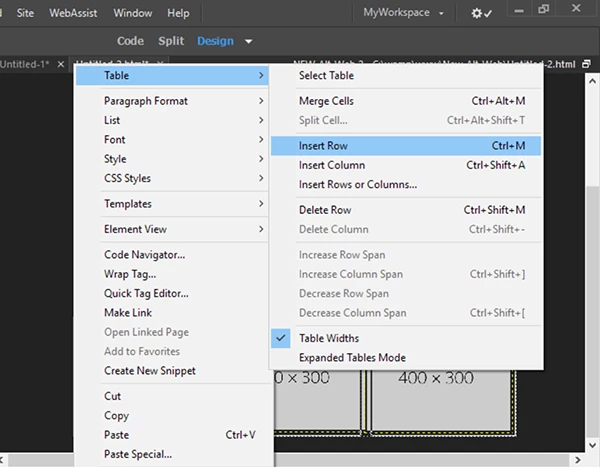
Right-click, Table > Insert Row (Ctrl + M). Repeat for additional rows.

2 replies

Nancy OShea
Community Expert
Nancy OSheaCommunity ExpertCorrect answer
Community Expert
February 27, 2018

Save your work (Ctrl +S).

From Design View, select the last row of your table.

Right-click, Table > Insert Row (Ctrl + M). Repeat for additional rows.

Nancy O'Shea— Product User & Community Expert
capriciab14166948
Participant
February 27, 2018

Thank you for responding. I was adding rows using the Edit > Table >

Insert Row method. At the end of the page, I needed to add some additional

rows and the system was not adding them. I think that I have discovered

that by adding the code manually, I may be able to add the additional

rows.

Again thank you for your help.

Capricia Bouler

[Personal info removed by moderator]

Nancy OShea
Community Expert
Community Expert
February 27, 2018

Are we talking about table rows or Bootstrap rows or something entirely different?

A look at your code might help shed some light on the problem.

Nancy O'Shea— Product User & Community Expert
capriciab14166948
Participant
February 27, 2018

I'm talking about table rows. Any help that you can provide will be

greatly appreciated.

Attached is the code that I use.

Capricia Bouler

[irrelevant info removed by Mod]

Nancy OShea
Community Expert
Community Expert
February 27, 2018

This web forum doesn't support emailed attachments.

Copy & paste your code into a web forum reply.  Don't use email.

Nancy O'Shea— Product User & Community Expert