Inspiring
October 6, 2022
Answered

Interface Colours

  • October 6, 2022
  • 1 reply
  • 442 views

Hi folks.

In Dw I'm using the interface 'Light'.

The problem is, when I highlight say <div> and look for the closing </div>, it's highlighted in a very pale colour, so not easy to see,

Is there a way to change this highlighting colour whithout changing the whole interface theme?


(See attached)

    This topic has been closed for replies.
    Correct answer Nayan_Kankariya

    Hi @BigDingus,


    Thanks for writing to us. You can change the highlighting color by creating a custom theme with base theme as Light (to retain the Light interface settings) by following below steps.


    1. Refer below KB article to create a custom theme with Light theme as per your requirement.
    2. Click on Edit button on newly created theme --> Opens main.less file in code view.
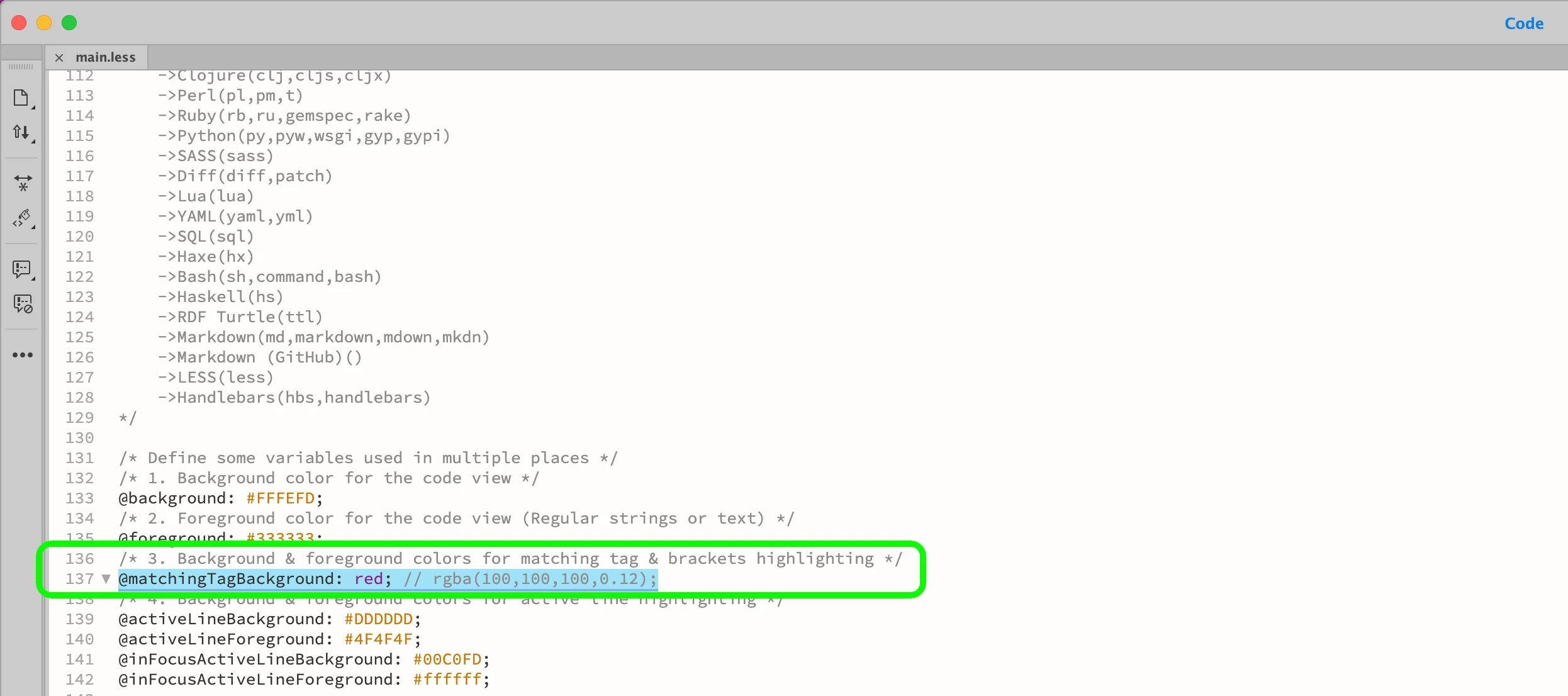
    3. Change the color value for @matchingTagBackground and save the file (refer below screenshot).
    4. Invoke Preferences dialog --> Interface section --> Select and Apply the newly created theme.

     

    Refer KB article for details: https://helpx.adobe.com/dreamweaver/using/customize-code-coloring.html


    Have a pleasant day!


    Regards,

    Nayan

    Dreamweaver Team

    1 reply

    Nayan_Kankariya
    Community Manager
    Nayan_KankariyaCommunity ManagerCorrect answer
    Community Manager
    October 6, 2022

    Hi @BigDingus,


    Thanks for writing to us. You can change the highlighting color by creating a custom theme with base theme as Light (to retain the Light interface settings) by following below steps.


    1. Refer below KB article to create a custom theme with Light theme as per your requirement.
    2. Click on Edit button on newly created theme --> Opens main.less file in code view.
    3. Change the color value for @matchingTagBackground and save the file (refer below screenshot).
    4. Invoke Preferences dialog --> Interface section --> Select and Apply the newly created theme.

     

    Refer KB article for details: https://helpx.adobe.com/dreamweaver/using/customize-code-coloring.html


    Have a pleasant day!


    Regards,

    Nayan

    Dreamweaver Team

    BigDingusAuthor
    Inspiring
    October 6, 2022

    Thanks Nayan.

    Your explanation was very clear and did the trick.